
Choosing a payment processor isn’t about finding the “best” provider. It’s about building a payment stack that gives your business the coverage, performance, and flexibility it needs to grow.
No single payment processor is best at everything. One may deliver stronger authorization rates in a particular market, another may offer better local payment methods, while a third provides more competitive pricing or fraud capabilities.
That’s why many growing merchants don’t rely on a single processor. They use multiple providers, routing transactions between them based on factors like geography, payment method, cost, and performance.
This guide explains how payment processors differ, what to look for when evaluating them, and when it makes sense to add another processor instead of replacing the one you already have.
Looking to manage multiple payment processors without adding engineering complexity? Speak with Primer.
How payment processors differ
There are hundreds of payment processors operating around the world, each with different strengths. Some specialize in particular regions, industries, or payment methods. Others focus on enterprise businesses or specific use cases.
Here’s how payment processors differ:
Coverage: where they actually operate
Processors differ in the countries and regions where they can operate, as well as the currencies and acquiring arrangements they support in each market.
As you expand, you may need to add processors that can operate in the new markets you enter.
Performance: how successfully they process transactions
Processor performance is primarily measured by authorization rate: the percentage of payment attempts approved by the card issuer.
There is no universal benchmark. Authorization performance can vary by processor, market, card type, issuer, transaction type, and customer segment.
Even small differences in approval rates can have a direct impact on revenue. A processor that performs strongly for domestic debit cards in one market may deliver lower approval rates for credit cards, cross-border transactions, or higher-risk payments elsewhere.
When comparing processors, ask for authorization data that reflects your actual transaction mix. Review performance by market, card type, issuer, transaction type, and decline reason rather than relying on a single headline approval rate.
Read more: What is payment authorization and how does it work?
Payment method support
Alternative payment methods are now a standard part of checkout, from local methods like Pix in Brazil to digital wallets like Apple Pay and Google Pay, and buy now, pay later options like Klarna.
But support varies significantly by processor. One provider may give you strong card coverage in North America, but limited access to local payment methods in Europe, Latin America, or APAC. Another may support the right local methods, but lack the acquiring coverage or reporting depth you need elsewhere.
Some digital wallets can be integrated directly by your engineering team. Others are only available through a payment service provider (PSP) with a direct relationship to that specific scheme or provider.
That makes payment method support a strategic part of processor selection. If your processor doesn’t support the methods your customers prefer, you risk losing sales at checkout. And if it can’t add new methods quickly as customer expectations change, your payment stack can become a constraint on growth.
Fee structure and transparency
Payment processors typically price card transactions using one of two structures: blended pricing or Interchange++ (IC++). The main difference is how costs are presented.
1. Blended pricing: The processor combines interchange, card network fees, and its own markup into a single rate.
For example, Stripe’s standard US pricing is 2.9% + $0.30 per successful domestic card transaction. On a $100 payment, the merchant pays $3.20, regardless of the specific interchange and card network fees behind the transaction.
This makes costs easier to understand and forecast. However, merchants receive less visibility into how much of the fee goes to the issuer, card network, and processor.
2. Interchange++ pricing: The processor separates the fee into three components:
- The interchange fee charged by the card issuer
- The fee charged by the card network
- The processor’s markup
This gives merchants a more detailed view of what they are paying and can make it easier to identify opportunities to reduce costs. However, transaction costs vary, so reporting and reconciliation can be more complex.
The commercial terms within either structure can still be customized. Processors may offer different rates based on factors such as transaction volume, average order value, markets, card mix, risk profile, and business model.
When comparing processors, ask whether pricing is blended or IC++, what’s included in the processor’s markup, and how clearly each component is shown in reporting and settlement data.
Fraud and risk management
Some processors include built-in fraud tools that score each transaction for risk and block suspicious payments automatically. Others rely on third-party integrations with dedicated fraud platforms.
For example, Stripe Radar uses machine learning to score transactions in real time. Adyen's RevenueProtect offers configurable rules and the ability to customize risk thresholds.
Other processors offer more basic protection and rely on you connecting a dedicated platform like Signifyd, Riskified, or Forter. These independent tools can be more sophisticated than built-in offerings, but they add another cost that you need to consider.
Reliability, reporting, and integration
Processor outages are uncommon but they do happen. You should ask about uptime guarantees and service level agreements (SLAs) that commit the processor to a minimum uptime percentage.
When it comes to reporting, each processor uses its own format. Some offer detailed breakdowns by card type and decline reason, while others provide high-level summaries.
Consider integration complexity as well. Some processors offer clean, documented APIs that your team can work with quickly. Stripe is often regarded as having the fastest onboarding process, while Adyen's setup is more tailored but typically requires more technical resources.
Support and account management
The level of support available can vary significantly between processors. Some offer largely self-service support, while others provide dedicated account managers, technical specialists, and solution engineers.
A strong account team can help you troubleshoot issues, optimize payment performance, plan expansion into new markets, and understand local payment requirements.
When comparing processors, ask what support is included, when technical help is available, and whether you will have access to people with payments and local market expertise.
Developer experience
The developer experience affects how quickly your team can integrate a processor and how easily it can manage the integration over time.
Look at whether the processor’s APIs and SDKs are well documented, reliable, and easy to work with. Check whether the sandbox reflects the live environment, whether webhooks are consistent and easy to debug, and whether the dashboard makes it simple to test transactions, investigate errors, and manage the integration without relying heavily on support.
A processor with clear documentation and reliable developer tools may be faster to integrate and easier to maintain.
Questions to ask when evaluating a payment processor
Choosing the right payment processor starts with asking the right questions. Use these questions to compare providers based on the things that will have the biggest impact on your business.
Here are some to get you started.
- Where does this processor operate? List the countries where you process payments today. Check whether the processor processes payments domestically in each of those markets.
- What are the authorization rates for my specific profile? Ask for data specific to your industry and how your customers make payments.
- What is the total cost of processing my actual transaction mix? Add up all processor-specific fees: chargeback fees, currency conversion charges, and monthly minimums.
- Which payment methods are fully supported in my target markets? Verify that the specific methods you need are available, fully integrated, and supported in the currencies you require.
- How easy is it to leave? Are your card tokens portable, or are they locked to this processor? This is especially important for subscription businesses, where locked tokens can make switching impossible without churning subscribers.
- How reliable is the platform? Ask about uptime, service level agreements, incident history, redundancy, and how the processor handles outages. Payment resilience becomes increasingly important as your business grows.
Read more: Payment optimization: what is it and where do you start?
When switching payment processors is worth it
It may be time to evaluate a new payment processor when your current provider is holding back revenue, increasing costs, or making it harder to grow.
You can identify this when:
- Approval rates are underperforming in key markets. This is especially important when declines are concentrated in specific regions, card types, issuers, or customer segments.
- Processing costs are no longer competitive. If processing fees have risen, your transaction mix has changed, or your provider won’t offer more competitive terms, it may be time to benchmark alternatives.
- Expansion is exposing coverage gaps. A processor that works well in your home market may lack local acquiring, relevant payment methods, or strong bank relationships in the next market you want to enter.
- Reporting isn’t giving you enough visibility. If you can’t easily understand approval rates, decline reasons, fees, or processor performance, it’s difficult to identify where revenue is being lost or where improvements can be made.
- Operational support is slowing you down. Slow support, inflexible integrations, or an inability to adapt your payments setup without significant engineering effort can all be signs you’ve outgrown your current provider.
When adding a second processor is better than switching
If your current processor performs well in some markets, payment methods, or customer segments, replacing it entirely means giving up those strengths. Adding a second processor lets you optimize performance where your existing provider falls short while keeping what already works.
This is where payment orchestration becomes valuable. Instead of building and maintaining another direct integration, an orchestration platform lets you connect to multiple processors through a single API and route transactions based on performance, cost, geography, payment method, or risk.
That gives you more control without adding the usual operational burden. It also reduces dependency on a single provider. If your primary processor has an outage or starts underperforming, you can reroute transactions to another provider instead of losing sales.
That’s why many enterprise merchants don’t choose between processors. They orchestrate them.
How Primer makes a multi-processor strategy work without the complexity
Primer gives merchants the infrastructure to build, manage, and optimize a multi-processor payment stack from one place.
Through a single integration, you can connect to local and global processors, payment methods, fraud tools, and other payment services. From there, your team can activate new connections, build routing logic, store payment tokens independently, trigger fallbacks, and monitor performance across providers without rebuilding your payments setup each time something changes.
That means you’re not locked into one processor’s coverage, pricing, or performance. You can route transactions based on market, card type, payment method, risk, cost, or provider availability, while keeping visibility across the full payment journey.
Activate processors and route payments without code
Primer’s connections library lets you add new payment processors without building or maintaining custom integrations. Every connection is built, maintained, and updated by Primer, so your team can adopt new providers without increasing engineering overhead.
Primer Workflows puts your payment strategy in the hands of your payments team. Instead of relying on engineering to implement routing changes, you can define, test, and update rules based on card type, issuer, geography, currency, transaction value, payment method, or your own business logic, with changes taking effect immediately.

Store card details independently so you're never locked to one processor
Primer's agnostic token vault is PCI DSS Level 1 compliant and stores card tokens independently of any processor. If you add a second processor or change your routing rules, your customers don't need to re-enter their details.
Primer also supports Network tokenization, creating tokens at the card network level rather than the processor level Because network tokens are automatically updated when cards are renewed or replaced, they help reduce failed payments, improve authorization rates, and can qualify for lower processing fees with some card networks.
Recover failed payments automatically with Fallbacks
Fallbacks automatically retry a declined payment with a secondary processor. Primer’s Unified Mapping Standard normalizes decline codes across processors, so the platform knows when to retry without risking card network fines.
Primer also preserves the outcome of 3D Secure (3DS) authentication. If a payment is retried with another processor, the authentication result travels with the transaction, so the customer doesn’t need to complete 3DS again. That improves recovery rates while maintaining a seamless checkout experience.

See performance across every processor in one dashboard
Primer Observability pulls data from every connected processor into a single filterable view, giving you a consistent way to compare authorization rates, decline reasons, transaction volumes, and processor performance across your entire payments stack.
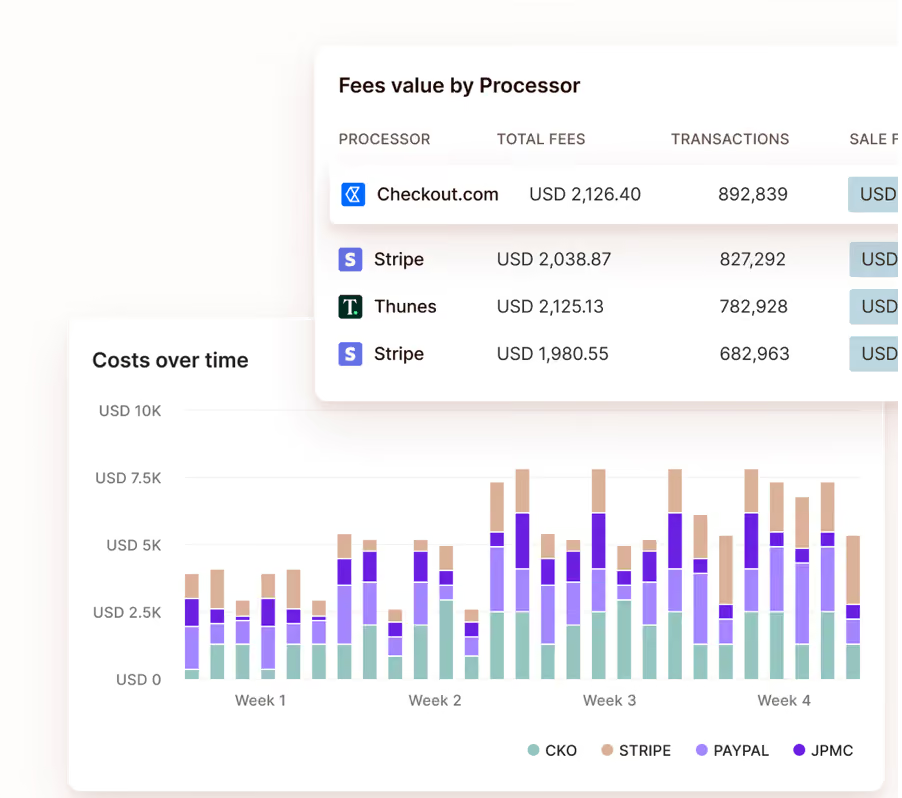
Costs Overview extends that visibility to processing fees. Instead of reconciling reports from multiple providers, you can see processing costs in one place, compare what each processor charges for the same transaction types, identify fee discrepancies, and uncover opportunities to reduce costs by changing your routing strategy.
Get AI-powered guidance on your payment strategy
Primer’s AI Companion analyzes your payment data and gives you guidance to help speed up decision-making. It surfaces insights about which processor is underperforming for a specific card type or region, so you can act on opportunities faster.
Because AI Companion has access to a unified view of your payment data, it delivers recommendations based on your complete payments operation rather than the data held by a single processor.
How Zing uses Primer to take control of its payment stack
Zing Coach is a subscription-based AI fitness app. As it took payments in-house, it needed full control over its payment setup: the ability to add processors, set up routing, and recover failed payments without a long development cycle.
Using Primer, Zing recovered 20% of previously failed payments through Fallbacks and added new payment methods without engineering involvement.
"Primer gives us the speed to move like a startup but operate with enterprise reach," says Elaine Nguyen, Payments Operations Lead at Zing. "We can enter a new market, switch on the right payment methods, and see results almost immediately."
Move beyond a single processor without rebuilding your infrastructure
Choosing a payment processor is an important decision, but it's not a permanent one. Your business will grow, and the processor that serves you well today may not be the right fit for every future market or card type.
The merchants that get the most from their payment stack treat processor selection as an ongoing strategy. They evaluate performance by market, compare costs across providers, and keep the flexibility to add volume as their business evolves.
Primer makes this possible through a single integration: activate processors in a few clicks, route payments based on real performance data, and see everything in one dashboard.
Book a demo to see how Primer helps you build a payment stack that grows with your business.
Frequently Asked Questions (FAQ): Choosing a payment processor
What’s the difference between a payment processor and a payment gateway?
A payment gateway captures and securely passes payment details from the checkout to the payment processor. The processor then communicates with the card networks, acquiring bank, and issuing bank to authorize and settle the transaction. Some providers bundle gateway and processing services together, while others let merchants connect to multiple processors through a separate infrastructure layer.
How do payment processors charge transaction fees?
Payment processors may charge transaction fees using flat-rate, interchange-plus, tiered, or custom pricing models. The total cost can also include interchange fees, chargeback fees, cross-border fees, currency conversion fees, gateway fees, and payment-method-specific fees. That’s why merchants should compare the full cost of their actual transaction mix, not just the headline rate.
Why does PCI compliance matter when choosing a payment processor?
PCI compliance matters because cardholder data has to be handled securely. Some processors and payment platforms reduce the compliance burden by tokenizing card details or storing them in a PCI DSS Level 1 compliant vault. For merchants using recurring payments or multiple processors, independent token storage can also help avoid being locked into one provider.

%20(1).png)