Last updated: July 2026
Choosing a payment processor used to be straightforward. You picked Stripe or PayPal, plugged it in, and moved on. But as your business grows, that early decision starts pulling in different directions. Maybe your checkout conversion in Germany isn't where it should be, or your finance team is tired of reconciling across two disconnected dashboards. Maybe you've realized that the processor you chose for speed two years ago doesn't support the local payment methods your customers actually want to use.
The comparison itself has changed, too. Stripe and PayPal have both expanded significantly, each carving out different strengths across pricing, coverage, developer tooling, and buyer trust. The question isn't just "which one is cheaper?" anymore. It's about which combination of capabilities matches how your business actually operates today, and where it's heading.
This article breaks down the real differences between Stripe and PayPal in 2026, with updated fees, coverage, and feature details. We'll also show you a third option: how payment orchestration lets you use both processors through a single integration, so you don't have to choose at all.
Looking for a platform to help you add payment processors without any code (after initial integration)? Book a demo with Primer to see how it works
What are Stripe and PayPal?
Stripe is a technology-first payment platform built for developers. Founded in 2010, it has grown into one of the largest online payment processors in the world, processing over $1 trillion in payments in 2023. Stripe primarily operates on a blended pricing model, with fixed rates that combine interchange, network, and processing costs into a single fee. This makes standard pricing relatively predictable, although custom and interchange-plus pricing may be available to larger businesses.

PayPal is one of the most recognized consumer payment brands globally, with 439 million active accounts as of Q4 2025. It offers a plug-and-play checkout experience that requires minimal technical setup, making it a popular choice for small businesses and merchants who want to start accepting payments quickly. PayPal's buyer and seller protections also contribute to high consumer trust, which can boost conversion at checkout.

Both platforms offer wide international coverage, fraud protection, and support for recurring billing. But their approaches differ in meaningful ways, from pricing structure to developer flexibility to how the checkout experience looks and feels. The comparison chart below covers the key areas side by side.
Later in this article, we'll show how payment orchestration lets you use both Stripe and PayPal through a single integration, so you don't have to choose.
Stripe vs PayPal: Comparison chart
Data is sourced from Stripe and PayPal’s official websites and is accurate as of July 2026. Pricing and features may vary by region, use case, and commercial agreement, and may change over time.
Pricing and fees
For standard online card payments in the US, Stripe’s headline rate is 2.9% + $0.30 per successful domestic card transaction, while PayPal’s standard PayPal Checkout domestic commercial rate is 3.49% + $0.49 per transaction.
On a $100 US domestic transaction, that means Stripe charges $3.20 and PayPal Checkout charges $3.98, a difference of $0.78 per transaction under those specific pricing assumptions. At scale, that gap can become material to your processing costs.
Cost, however, is only one part of the decision. PayPal’s brand recognition and buyer protections can increase checkout completion rates for some merchants, especially when buyers trust PayPal more than an unfamiliar store brand. In practice, the incremental conversion you get from offering PayPal alongside cards can offset its higher per‑transaction fees, depending on your audience, average order value, and markets.
For recurring billing, Stripe’s pay‑as‑you‑go Billing plan charges 0.7% of Billing volume on top of standard processing, with no separate minimum on that usage‑based tier.
PayPal’s subscriptions and recurring tools generally use the same underlying transaction fees as one‑off payments, and a £20/month fee applies specifically to Website Payments Pro in the UK, rather than to all PayPal subscription use. If subscription revenue is significant, these structural differences – percentage of billing volume vs. product‑specific monthly fees – can materially influence your unit economics.
Why merchants often choose between Stripe and PayPal
If you're deciding between Stripe and PayPal, you're not alone. Many merchants opt for one over the other to simplify their operations. But why do businesses hesitate to implement both? Here are some common challenges:
- Limited engineering resources: Integrating and maintaining two payment providers requires significant technical effort, especially for smaller teams. Adding multiple providers can feel like a luxury when resources are stretched.
- Operational complexity: Managing separate systems for reporting, reconciliation, and payment tracking can create inefficiencies and lead to errors. Merchants often choose one platform to keep workflows manageable.
- Cost concerns: Each payment provider has unique fee structures and pricing models for handling online transactions. Without a clear strategy, using both could increase transaction costs without delivering a clear return on investment.
- Checkout experience: Offering multiple payment options can complicate checkout flows if not implemented thoughtfully, leading some businesses to stick with a single provider to maintain simplicity.
Fortunately, there is a solution that can help you avoid these challenges, and easily integrate both Stripe and PayPal.
Payment orchestration: a solution that allows you to use both
Payment orchestration simplifies the way businesses manage payments by centralizing integrations with multiple payment providers and methods into a single platform. This allows merchants to tailor transaction flows to meet specific business needs while reducing operational overhead.
With payment orchestration, businesses can route payments dynamically across different providers based on custom rules, such as location, transaction size, or provider performance. Think of it as the operational hub for your payment processor comparison, bringing all your providers under one roof.
A payment orchestration platform typically handles several key areas of the payment process:
- Acceptance: Offers the most relevant payment options to customers, ensuring a smooth checkout experience.
- Routing: Automatically directs transactions through the most efficient routes, boosting success rates and minimizing processing costs.
- Reconciliation: Consolidates data from all payment providers to simplify accounting and ensure accurate settlement.
- Analytics: Delivers a unified view of payment performance, helping businesses identify trends and optimize their strategies.
Some key benefits of a payment orchestrator include:
- Optimizing costs: Route transactions to the lowest-cost provider and use the platform's scale to negotiate better rates with PSPs, improving margins while reducing expenses.
- Increasing speed to market: Connect to new PSPs in hours rather than weeks, eliminating the need for months of engineering work to build and maintain integrations.
- Expanding globally: Offer local payment types to reach new demographics and reduce cart abandonment by presenting customers' preferred payment options dynamically at checkout.
- Reducing fraud: Use features like 3DS in high-risk payment flows, with strong authentication and pre- and post-payment checks to lower fraud and chargebacks.
- Improving authorization rates: Optimize payment routes to reduce declines and authorize more payments by connecting to PSPs with higher success rates for specific data points, such as issuing banks.
- Simplifying operations: Manage all payments and add new PSPs without engineering resources while centralizing payment data for improved visibility and decision-making.
Want to learn more about how an orchestrator can improve how you handle payments? Read on: What is payment orchestration and how does it work?
How Primer's unified payments infrastructure unlocks your payment options
At Primer, we operate as a Unified Payment Infrastructure, with orchestration being one of our strongest use cases. Our platform helps merchants optimize payment processing performance, build faster, and capture untapped revenue.
With Primer, there's no need to choose between Stripe, PayPal, or other options. You can use many processors all through a single integration, in just a few clicks. This allows you to quickly and efficiently select the best fit based on your business priorities.
Here's how Primer can transform your payment systems:
Integrate with multiple PSPs without needing engineering resources
If you're researching the differences between Stripe and PayPal, you might have limited engineering resources and are hesitant to integrate and maintain multiple processors. Or perhaps you're a scaling business looking to add an additional processor to add redundancy to your payments.
Given the complexity of integrating with new PSPs, many merchants have to make compromises and choose one over the other, ultimately hampering their payment performance.
With Primer, there's no need to compromise. We've already built integrations with the world's leading PSPs, including PayPal and Stripe. Once connected to Primer, you can access these PSPs with minimal additional engineering effort.
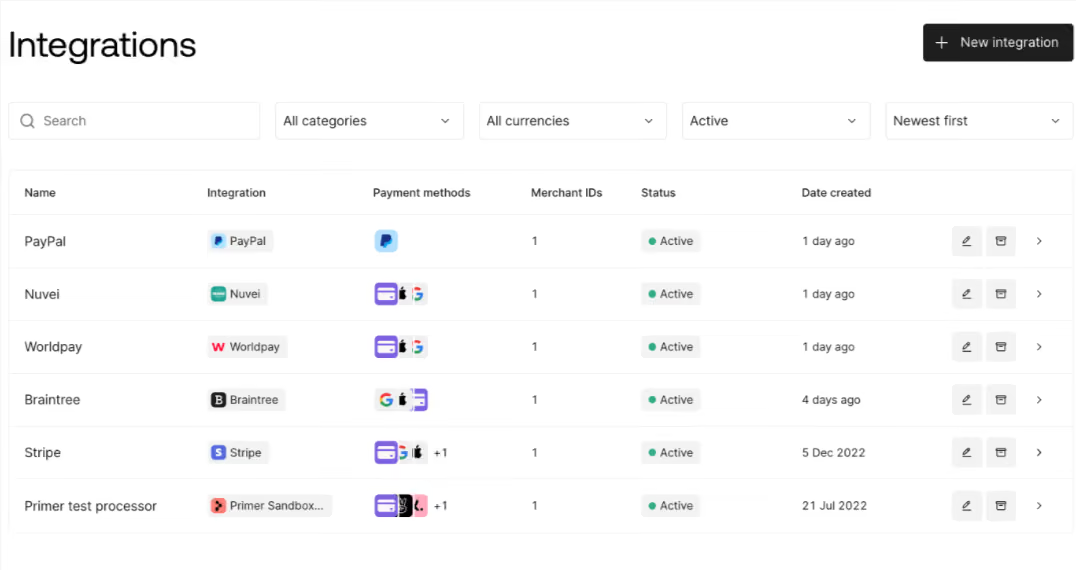
Whatever your use case, Primer will enable you to integrate with PSPs with no code, so you can quickly expand your payments infrastructure.
Adding a new PSP with Primer is simple:
- Go into the Integrations section of Primer's dashboard
- Click the black box with "+ New integration"
- Select the desired payment provider from the menu
- Add your account details for the payment provider, then add your merchant account
- Choose which payment methods to use with the provider
As soon as you complete these steps, your new PSP is added to your Primer account and ready for you to use. It really is that simple.
This flexibility is exactly why micromobility leader Beam chose Primer to support an expansion to five new countries (New Zealand, Indonesia, Turkey, Australia, and Malaysia) in one year.
"Primer's solution has removed much of the complexity around payments and enabled us to focus on building a meaningful presence in these new markets," said Bhavin Shah, VP of Product Management of Beam.
Set up Fallbacks to recover failed payments
Working with multiple PSPs unlocks a world of opportunities to optimize your payment performance.
With Primer Workflows, you can easily create advanced routing logic in just a few clicks, enabling you to direct payments to different processors based on various conditions, such as region, currency, or transaction type.
Additionally, you can implement Fallbacks to automatically reroute payments to an alternative processor in case of downtime or failure, ensuring continuous transactions and minimizing disruptions.
Primer automatically retries soft decline transactions with your Fallback processor, so customers aren't aware of any issues and don't need to re-enter payment information. According to our research, an average payment recovery rate of 38% when a Fallback is triggered.
Centralize your payment data for better strategic insights
A clear view of all your PSPs' performance is essential for optimization. However, if you integrate with multiple PSPs separately, you must access each payment platform separately. This makes getting all your payment data in one place tedious and time-consuming.
In contrast, Primer's Observability dashboard gives you real-time information on all of your payment processors, all in one easy-to-use dashboard. You can sort and analyze your data with 30+ standard filters (like issuer, Merchant ID, and account type) and create further customized views based on your unique requirements.

You can also set Monitors that alert your team to unusual behavior, such as a spike in payment failures. This allows you to act quickly when a problem occurs.
For Maisons du Monde, Observability enables the company "to monitor performance across all our payment methods and processors in one dashboard," says Jérémy Lechardeur, who controls Maisons du Monde's retail technology stack. "This is essential as we optimize our payment performance and monitor our payment flows for any issues."
Read more: Maisons du Monde selects Primer as its payments infrastructur
Ferryhopper: recovering €3.4 million with Primer Fallbacks
One of the main benefits of using multiple payment processors is resilience. If one provider experiences an issue, transactions can be rerouted to another instead of failing outright.
That is exactly what happened at Ferryhopper during its busiest month. When a processor issue threatened thousands of bookings, Primer Fallbacks automatically rerouted transactions to a secondary processor before customers felt the impact.
Fallback usage rose from around 20 transactions per day to as many as 3,000. By the time the issue was resolved, Primer had helped Ferryhopper recover approximately €3.4 million in transactions.
This multi-processor setup also supported a record-breaking season in which Ferryhopper handled 47% more peak-season transactions year on year and improved its authorization rate by more than two percentage points.
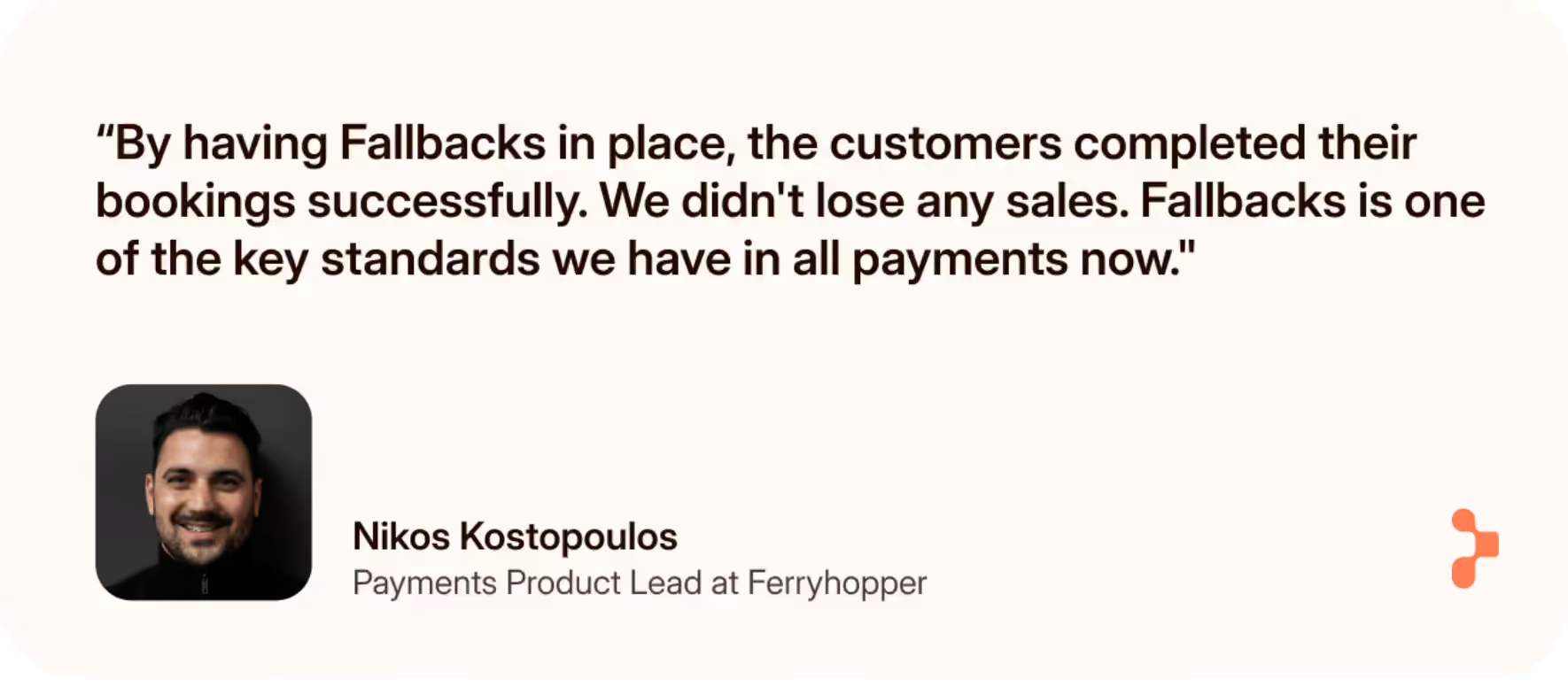
As Nikos Kostopoulos, Payments Product Lead at Ferryhopper, explains: “If we hadn't had the fallback mechanism in place, customers would have either abandoned the sale or retried, and we would have had a big increase in customer support tickets.”
Read the full case study here: Charting a new course for payments at Ferryhopper
Use both Stripe and PayPal with Primer
Both Stripe and PayPal offer reliable global payment products for their customers. But even leading payment providers may not offer the exact combination of services and regions that's right for your business, especially if you're rapidly expanding your operations.
Primer ensures you get the payment coverage and options you need without adding unnecessary complexity.
To learn more about how Primer can help you optimize your payments, contact our experts today
Frequently asked questions (FAQ): Choosing Stripe or PayPal
Is it cheaper to use Stripe or PayPal?
For standard online card payments in the US, Stripe’s headline rate is 2.9% + $0.30 per successful domestic card transaction, while PayPal’s standard PayPal/Venmo online checkout rate is 3.49% + $0.49 per transaction. On a $100 US domestic transaction, that means Stripe charges $3.20 and PayPal charges $3.98, a difference of $0.78 per transaction. Stripe is therefore cheaper in this specific scenario, but PayPal’s brand recognition and buyer protections can lift checkout completion for some merchants, which may offset the higher fee depending on your audience, average order value, and markets.
How much does Stripe charge for a $100 transaction?
On Stripe’s standard US online pricing, a $100 domestic card payment incurs a fee of 2.9% + $0.30, which works out to $3.20. In the UK, Stripe lists 1.5% + 20p for standard domestic UK cards, with different rates for premium and international cards, and higher fees when currency conversion applies. Enterprise or interchange‑plus deals can depart from these headline rates, so larger merchants may see different economics.
Can I use both Stripe and PayPal?
Yes. Many merchants use Stripe and PayPal side by side, and payment orchestration platforms like Primer let you connect both (and other PSPs) through a single integration. That means you can route transactions based on rules, set up fallback paths for failed payments, and manage configuration and reporting centrally, instead of maintaining separate point‑to‑point integrations for each processor.
Which is safer, Stripe or PayPal?
Both providers meet high security standards rather than one being categorically “safer” than the other. Stripe is a PCI DSS Level 1 service provider and offers Stripe Radar, a machine‑learning fraud detection tool, as part of its payments stack. PayPal is PCI compliant, references additional certifications in its trust and security materials, and offers Buyer Protection and Seller Protection programs for eligible transactions. In practice, the better fit comes down to which fraud tools, workflows, and protections map more closely to your risk profile and business model.
.png)