
Fallbacks automatically recover transactions that fail due to technical or processor issues.
When a payment can’t be completed through one provider, say, because of acquirer downtime or an API timeout, it’s instantly rerouted to another connected processor. The switch happens in real time, with no disruption to the customer experience.
For merchants, that gives you a powerful tool to recover revenue that was previously lost.
But fallbacks have their limits. They can only fix infrastructure-level failures. They can’t prevent customer-side issues like expired cards, insufficient funds, or abandoned authentication. Those require clear communication and the option to pay by alternative methods at checkout.
This guide explains how to tackle both. You’ll learn how to set up fallbacks to automatically recover from technical failures, and how to manage payment-method failures that can’t be fixed with code.
Want to learn more about Fallbacks on a 1-1 call with one of our payments experts? Reach out to Primer.
How do fallbacks work?
A fallback, also known as cascading payments, serves as a safety net for your soft-declined transactions.
Soft declines happen for a range of temporary or technical reasons, such as processor downtime, acquirer unavailability, or network timeouts. In these cases, the customer’s payment details are valid, but the transaction cannot be completed through the original route.
Here is how a fallback handles that situation:
- The system detects a soft decline and checks whether the failure is recoverable.
- If it is, the fallback automatically routes the transaction to an alternative provider. You, the merchant, will have already set up the logic for this.
- The transaction is retried instantly through that PSP.
- The customer doesn’t need to refresh, re-enter details, or take any action.
How to integrate fallbacks
There are two main ways to set up fallbacks in your payments stack.
1. Build them in-house
This option comes with significant technical overhead. Building your own fallback system means developing and maintaining complex routing logic, managing multiple processor integrations, and constantly monitoring performance across providers.
Each provider also uses different decline codes for soft declines, so your team must manually interpret and standardize them. This is resource-intensive and difficult to scale as your payment volume or provider network grows.
2. Use payment orchestration
Most merchants choose this route because it eliminates much of that operational complexity. Payment orchestration connects all processors through a single API, automatically standardizes decline codes, and manages routing logic behind the scenes.
This enables you to detect soft declines in real time, reroute transactions instantly, and recover revenue without additional engineering work. It also provides complete visibility across processors, making it easier to track performance and optimize your payment strategy over time.
In short, payment orchestration turns what would otherwise be a web of integrations and decline codes into one streamlined process that keeps transactions flowing and helps recover revenue that might otherwise be lost.
How do fallbacks fit in with payment methods?
Fallbacks cover your back for payment failures caused by processor problems, but it doesn't help with payment method-related failures.
But customer-action failures cost merchants significant revenue, too.
In 2023, we found out that two in three shoppers abandon a cart if their preferred payment method isn’t available. Even if it is, it can still fail for a number of reasons:
- Insufficient funds (this issue makes up 57% of card declines)
- Expired, stolen or blocked cards
- Incorrect card information or CVV
- Authentication failures, for example when a customer fails Strong Customer Authentication (SCA) or abandons the 3D Secure step
- Technical issues related to the payment method itself, like when a local alternative payment method is down
As a 2025 report by CoinLaw says, 42% of customers abandon a purchase after experiencing a card decline. This shows how vital it is for merchants to communicate payment failures to customers quickly and to provide sufficient alternative options to complete the transaction.
How to communicate payment failures to customers and prompt them to try a different payment method
When a payment fails because of a customer-side issue, communication determines whether you recover the sale or lose it. The goal is to help customers complete their purchase while keeping your checkout secure and friction-free.
If you reveal too much detail, you risk giving fraudsters information they can exploit. But if you say too little, customers feel confused and abandon checkout altogether. The key is to strike the right balance: informative enough to guide, but never so specific as to compromise security.
Here’s how to approach the most common scenarios:
Insufficient funds
Avoid stating the reason outright. Messages like “Insufficient funds” confirm that the card is active, which can help fraudsters test stolen credentials. Instead, keep messaging neutral:
“There was a problem processing this payment. Please try a different card or payment method.”
This approach protects your checkout while still giving genuine customers a clear next step. It keeps the tone helpful rather than punitive, reinforcing trust even in a failed transaction.
Authentication issues (3D Secure)
If the payment fails because the customer does not complete 3DS, you can safely guide the customer directly:
“Please approve the authentication request from your bank to complete the payment.”
Where regulations allow, consider using 3DS exemptions. offering a non-3DS route for low-risk transactions. This balance reduces friction and maintains compliance, helping legitimate buyers complete their purchase without unnecessary hurdles.
Technical glitches
Temporary network issues or timeouts often lead customers to think the problem is on their end. A simple apology and retry prompt works best:
“Something went wrong. Please try again.”
This short message reassures users that the issue is temporary and not their fault. It also helps you retain momentum at checkout, many merchants find that polite retry prompts recover a measurable share of abandoned sessions.
Blocked or suspicious payments
High-value or unusual transactions can trigger automatic blocks. Instead of showing a generic “Payment failed,” use alerts or follow-up messages to verify the attempt:
“We noticed an issue with your recent order. Please confirm your details to complete your purchase.”
This allows you to confirm legitimate buyers, prevent false declines, and rescue large-value sales without compromising fraud controls.
How Primer helps merchants handle payment failures
Payments can fail for reasons both seen and unseen.
Sometimes it happens deep in the infrastructure, when a processor times out or an acquirer goes offline. Other times, it happens in plain sight: a customer’s card expires, 3D Secure fails, or their chosen wallet is temporarily unavailable.
What matters most is what happens next.
Primer was designed to help merchants act in those moments: whether the failure sits behind the scenes or with the customer. It gives you the tools to automatically recover revenue, communicate effectively, and keep checkout experiences seamless from end to end.
On the infrastructure side, Primer’s Fallbacks feature handles processor-level issues in real time. When a transaction fails for a recoverable reason, Primer detects it instantly and reroutes it through another connected processor. Payments that once would have been lost now succeed silently, without the customer having to refresh, re-enter details, or even repeat authentication.
On the customer side, Primer helps you turn failed payments into second chances. You can:
- Add or localize new payment methods in minutes, from wallets and BNPL to local options like iDEAL.
- Edit your checkout experience instantly, without engineering overhead.
- Trigger automated messages through integrated third-party services that prompt customers to update their card details or try another method.
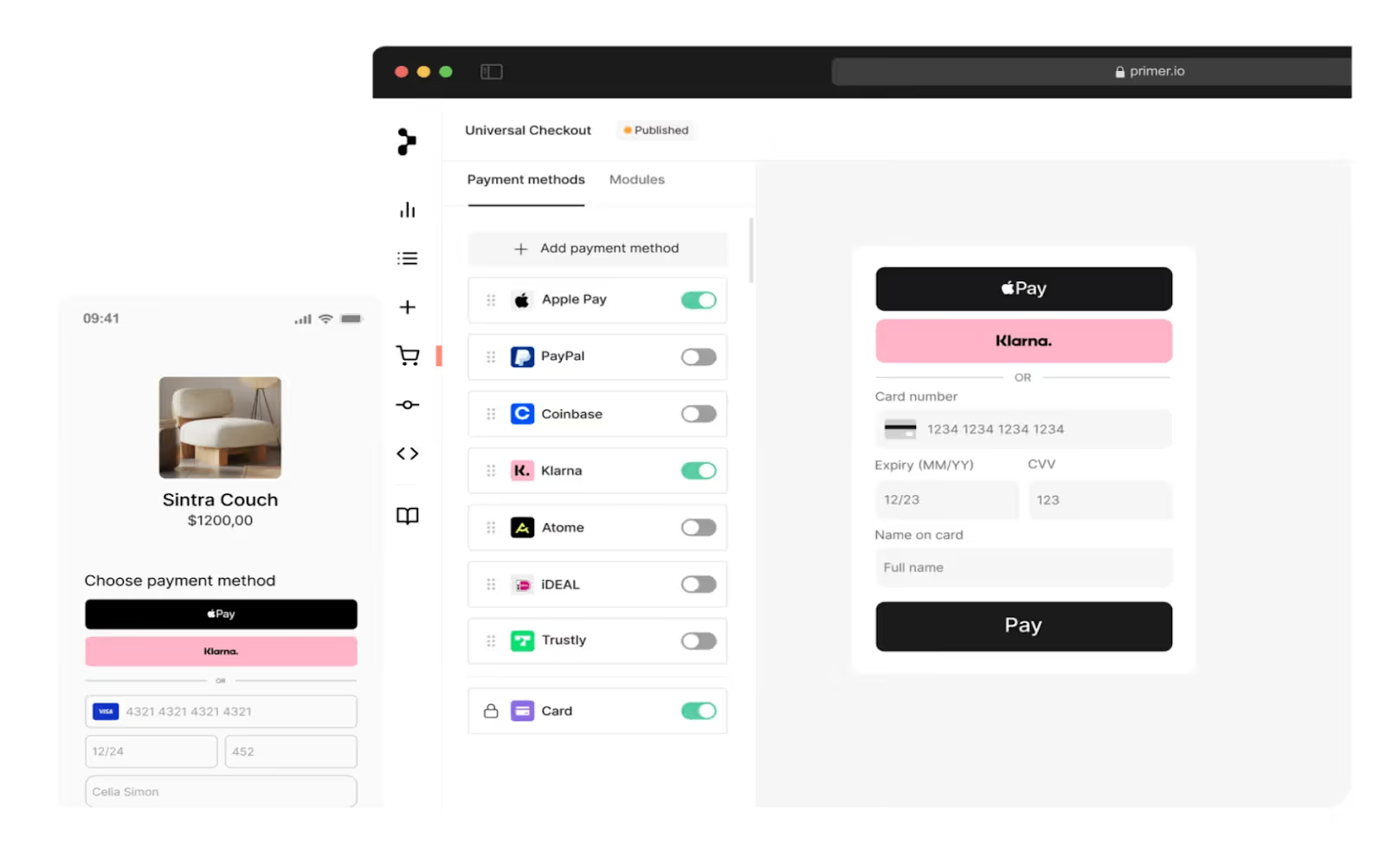
By connecting both layers, processors, and payment methods, Primer gives merchants a single place to prevent failures, recover transactions, and continuously improve payment performance.
Take the online travel agency Ferryhopper, for instance. Offering tickets from over a hundred operators across five hundred destinations, they needed a scalable payment infrastructure that’d help them recover lost revenue without friction.
By partnering with Primer and using our Fallbacks feature, Ferryhopper recovered 1% of total bookings: that’s revenue that otherwise would have slipped away. Read the full Ferryhopper case study here.
Want to turn payments into a strategy tool? With Primer, you can also:
View decline reasons, spot patterns, and optimize payments with Observability
Recovery is only part of the picture. To truly optimize your payments, you also need to understand why failures happen in the first place. Which processor is timing out most often? Where are soft declines coming from? Are specific payment methods underperforming in certain regions?
That’s where Observability comes in.
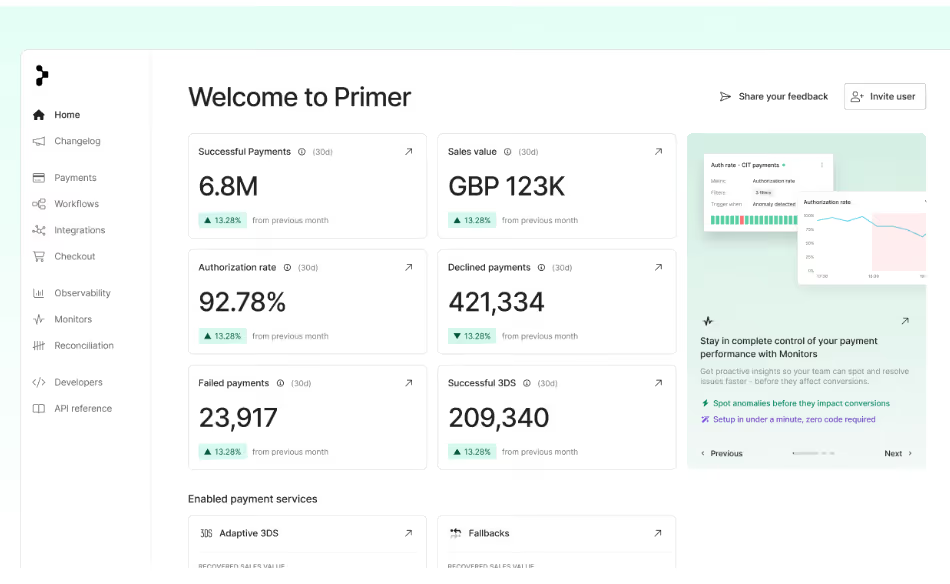
Observability captures and standardizes granular decline codes and messages across processors. This allows you to see the exact reasons behind failed transactions, including insufficient funds, issuer unavailability, and 3DS authentication issues.
With this level of visibility, you can make more informed commercial and operational decisions. By understanding which processors perform best by region, method, or issuer, you can negotiate better rates and service levels with PSPs, redirect volume to higher-performing providers, and identify where to introduce new payment methods or acquirers.
Observability gives you the clarity to strengthen your payment strategy, optimize routing, and build more transparent, performance-driven relationships with every payment partner.
Rescue lost revenue with Primer
Every failed transaction is a potential lost sale. But with Primer’s unified payment infrastructure, you can rewrite that story.
When a processor goes down, Fallbacks automatically re-routes transactions to a secondary PSP to keep revenue flowing. When a card fails, communicating effectively and offering more payment methods gives customers an easy way to complete the purchase.
And thanks to Observability, you get to see where, why, and how to improve your payments strategy.
Book a call with one of our experts to discuss how we can help you recover lost revenue and maximize profit.
FAQs: Fallback payment methods
1. What’s a fallback payment method?
A fallback payment method is sometimes used to describe an alternative payment option offered to customers at checkout when their primary credit or debit card fails. In reality, true fallbacks refer to the automation that reroutes a transaction to a different payment provider or gateway when the original route fails due to processor or network issues.
In the card-present world (e.g., POS terminals or ATMs), a fallback transaction has a different meaning: it’s when an EMV chip card fails to read and the terminal “falls back” to the magnetic stripe. Online fallbacks, like Primer’s Fallbacks feature, solve a similar problem on the infrastructure layer by maintaining redundancy in your payment processing stack.
2. How does the Fallbacks feature work in payments?
Primer’s Fallbacks automatically detects recoverable (soft) declines, such as network timeouts or temporary gateway outages, and re-routes the transaction through another processor in real time. This level of automation increases payment success rates and improves customer experience by keeping checkout uninterrupted.
3. How difficult is it to integrate Fallbacks into my payment strategy?
Without payment orchestration, integrating Fallbacks can be challenging. Merchants would need to design a full fallback strategy, standardize PSP decline codes, and maintain multiple payment solutions manually.
With a unified payments infrastructure platform like Primer, it’s simple. Primer automates routing logic, provides low-code workflows, and centralizes your metrics on authorization rates, soft declines, and chargebacks: giving you a clear view of performance across providers.
4. How can I add new payment methods with Primer?
With Primer, you can add new payment methods in just a few clicks. Once you integrate through Primer’s unified API, you can enable wallets, cards, and local payment schemes directly in your checkout. You can also localize payment options, customize your brand experience, and monitor how each method performs using unified metrics.
5. Do fallbacks help recover revenue?
Yes. By automatically retrying failed payments through secondary payment providers, Fallbacks help merchants recover revenue that would otherwise be lost. This minimizes failed transactions, reduces cart abandonment, and improves overall payment success.
Merchants using Primer’s Fallbacks solution have seen a recovery rate of up to 20% when immediately re-routing transactions: a huge improvement in both revenue and customer experience.

%20(1).png)