
How Primer analyzes BIN data
Primer analyzes cards on the first 12 digits. When a card is tokenized, Primer looks it up starting from the first 12 digits of the card number. It falls back to a shorter prefix only when there is no more precise range to match. So every card attribute you see, whether in the checkout, in Workflows, or in the API, comes from this 12-digit analysis, not from a simple 6-digit match. This matters because BINs have outgrown 6 digits. Since 2022, card networks have been expanding BIN ranges to 8 digits, and the newest ranges can need up to 12 digits to be identified precisely. The same 6-digit prefix can now belong to several issuers in different countries. Because Primer always matches the most precise range it can, your card attributes stay accurate as BIN ranges keep changing.For card logic, prefer attributes over raw BIN digits.Because every attribute comes from a 12-digit analysis, the attributes Primer returns are more accurate than anything you could build on the first 6 or 8 digits yourself. They are also easier to maintain. A rule like
Product usage type is BUSINESS stays clear and correct over time, while a list of raw prefixes like First 6 digits is 411111 becomes very hard to keep up to date as BIN ranges change.The exception is when you need to identify a specific card product rather than a category of card. Issuers often use the 8-digit BIN as the identifier of an individual product, so a campaign targeting one partner bank’s product requires the BIN itself. For those cases, use firstDigits, described below.The BIN digits Primer returns
Primer returns two BIN fields in thepaymentMethodData object of a payment, in API responses and webhooks:
Use
firstDigits whenever you need to identify a specific card product, for example a reward campaign with a partner bank that targets an 8-digit range. Use first6Digits where your logic depends on a fixed 6-digit length.
Both fields are permanent. first6Digits is not deprecated and existing integrations do not need to change.
PCI DSS permits sharing the card’s BIN together with the last 4 digits, and the BIN is at most 8 digits.
Use BIN data in your checkout
The Checkout SDK surfaces BIN data as soon as the customer types their card number, before any payment is created. You can use it to adapt your UI early: show or hide payment options, display the detected network, or block card types you do not support. The data arrives through theprimer:bin-data-available event. For co-badged cards, such as Visa and Cartes Bancaires on the same card, it lists every detected network with its own attributes:
firstDigits on this event always returns 6 digits, even where the payment object returns 8. The two fields share a name but not a length. If your logic needs the full BIN, read firstDigits from paymentMethodData once the payment is created.Use BIN data in Workflows
Card attributes from BIN data are available as conditions in Workflows, under Card information on the Payment created trigger. Use them to build routing, compliance, fraud, or 3DS rules based on what the card actually is.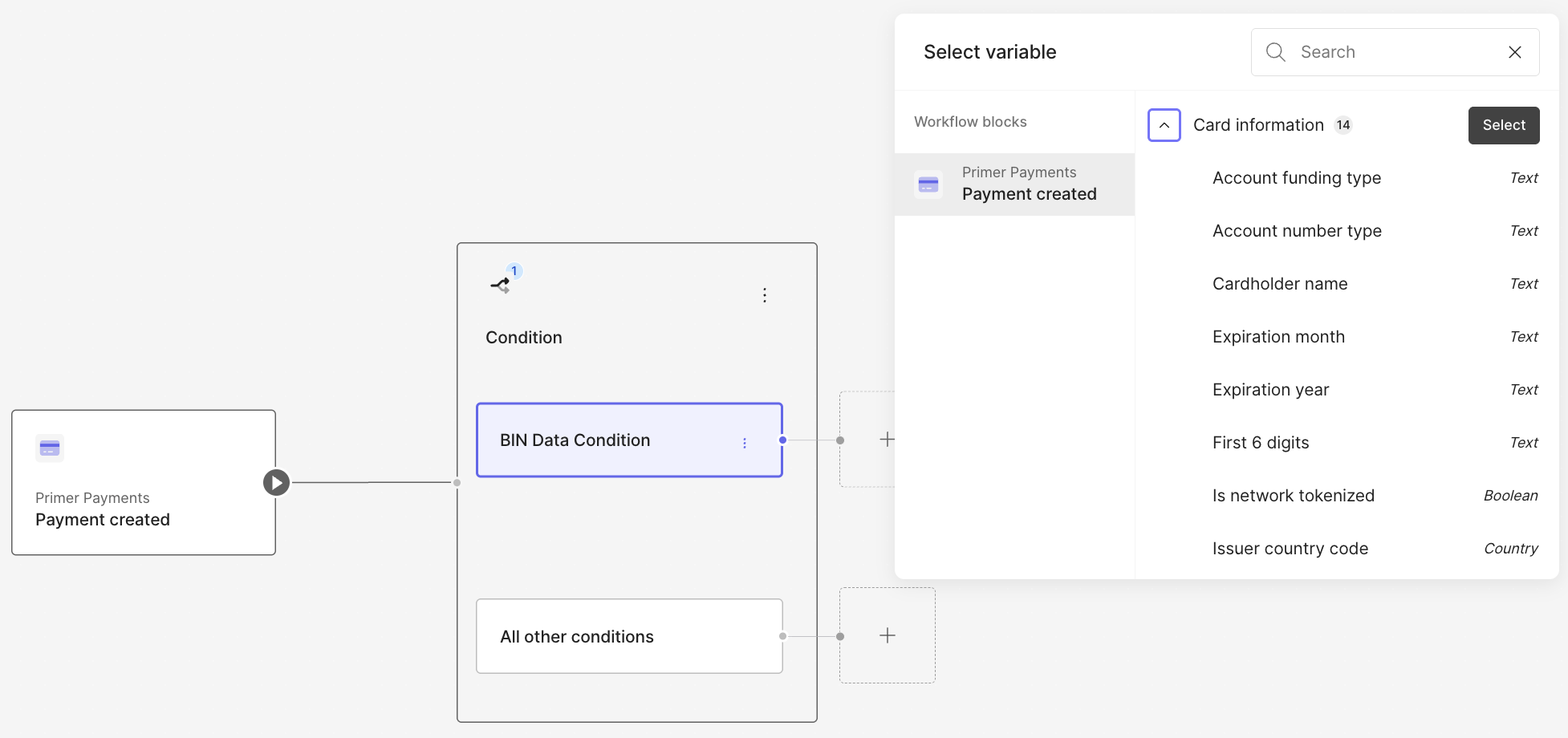
Card information conditions on the Payment created trigger in the Workflows builder
First 6 digits always matches on 6 digits. First digits matches
firstDigits from the API: 6 or 8 digits, depending on the card and network.
Note: productCode, productName, prepaidReloadableIndicator, and regionalRestriction are returned by the API and webhooks but are not yet available as Workflow conditions.
For example, to route business cards to a specific processor, use a single condition: Product usage type is BUSINESS. This is more accurate and easier to maintain than keeping lists of BIN prefixes in your rules.
Use BIN data via the API and webhooks
Once a payment is created, the resolved card attributes are returned in thepaymentMethodData object of the payment, both in API responses and in webhook notifications:
UNKNOWN when the range is not precisely identified:
accountFundingType:CREDIT,DEBIT,PREPAID,CHARGE,DEFERRED_DEBIT,UNKNOWNproductUsageType:CONSUMER,BUSINESS,GOVERNMENT,UNKNOWNaccountNumberType:PRIMARY_ACCOUNT_NUMBER,NETWORK_TOKEN,DIGITAL_PAN,UNKNOWNprepaidReloadableIndicator:RELOADABLE,NON_RELOADABLE,NOT_APPLICABLE,UNKNOWNregionalRestriction:DOMESTIC_USE_ONLY,NONE,UNKNOWN
productCode and productName are not enums. They are network-defined free-text values (for example F and Visa Classic), so treat them as opaque strings rather than a fixed set.
BIN data for Apple Pay and Google Pay
Wallet payments behave differently from raw card payments, because of how wallets tokenize cards.Apple Pay
Apple Pay payments always use a network token. The encrypted payment token Primer receives contains a device PAN (DPAN), not the customer’s actual card number. A DPAN is a tokenized card number that the card network issues for one specific device. Primer never sees the underlying funding card. As a result, BIN data for Apple Pay payments comes from the DPAN. DPANs are issued from their own BIN ranges, so some attributes can differ from the physical card. The funding type, the product type, or even the issuer details can be different.Google Pay
Google Pay payments come in two forms:PAN_ONLY: the token contains the real card number (FPAN). BIN data reflects the customer’s real card, exactly as for a raw card payment.CRYPTOGRAM_3DS: the token contains a DPAN, like Apple Pay. BIN data comes from the DPAN and can differ from the funding card’s attributes.
What this means for your integration
Two attributes help you tell DPAN-based payments apart from raw card payments. Both are available as Workflow conditions and inpaymentMethodData.
isNetworkTokenized means the card is represented by a digital PAN. It is always true for Apple Pay, and true for Google Pay CRYPTOGRAM_3DS payments, so a true value on a wallet payment tells you the BIN data came from a DPAN. Keep in mind that this flag can also be true for regular card payments that use Primer network tokenization, so on its own it does not prove that a payment is a wallet payment.
accountNumberType is the most precise signal. When BIN data comes from a digital PAN it resolves to NETWORK_TOKEN or DIGITAL_PAN, and to PRIMARY_ACCOUNT_NUMBER for a raw card.