
3DS Challenge Mandate
The Mandate Challenge option lets you explicitly request that a 3D Secure (3DS) challenge be presented to your buyer, rather than allowing the card issuer to decide whether to use a frictionless or challenge flow. This can help merchants meet compliance requirements, particularly when storing a card for future Merchant-Initiated Transactions (MITs), or when additional buyer verification is desired for risk or policy reasons. While issuers are not obligated to honor a mandated challenge request, most issuers in regulated regions (such as the EEA and UK) will do so under PSD2 Strong Customer Authentication (SCA) rules.How Mandate Challenge Works
By default, issuers decide whether to authenticate a buyer via a frictionless or challenge 3DS flow. When Mandate Challenge is enabled, Primer includes a flag in the 3DS authentication request that signals your preference for the buyer to be challenged. If the issuer supports mandated challenges, this usually results in a challenge screen being shown to the buyer (e.g., a one-time passcode, app approval, or biometric verification). If the issuer does not honor the mandate, the transaction will continue as a normal 3DS flow.When to Use Mandate Challenge
You should use the Mandate Challenge option when:- You’re storing a card for future Merchant-Initiated Transactions (MITs) (for example, subscriptions, recurring payments, or delayed charges) within a region that has requirements for 3DS, such as the EEA.
- PSD2 guidance recommends using a 3DS challenge for the initial card-on-file transaction, ensuring the cardholder has explicitly authenticated the storage consent.
- You need strong assurance of buyer authentication for higher-value or higher-risk payments.
- Your internal fraud or compliance policies require step-up authentication.
Implementing Mandate Challenge in Workflows
You can enable Mandate Challenge directly from the Perform 3DS action in your Workflows.Steps
- Add a Perform 3DS block to your Workflow.
- Under 3DS Options, select Mandate Challenge.
- Save and publish your Workflow.
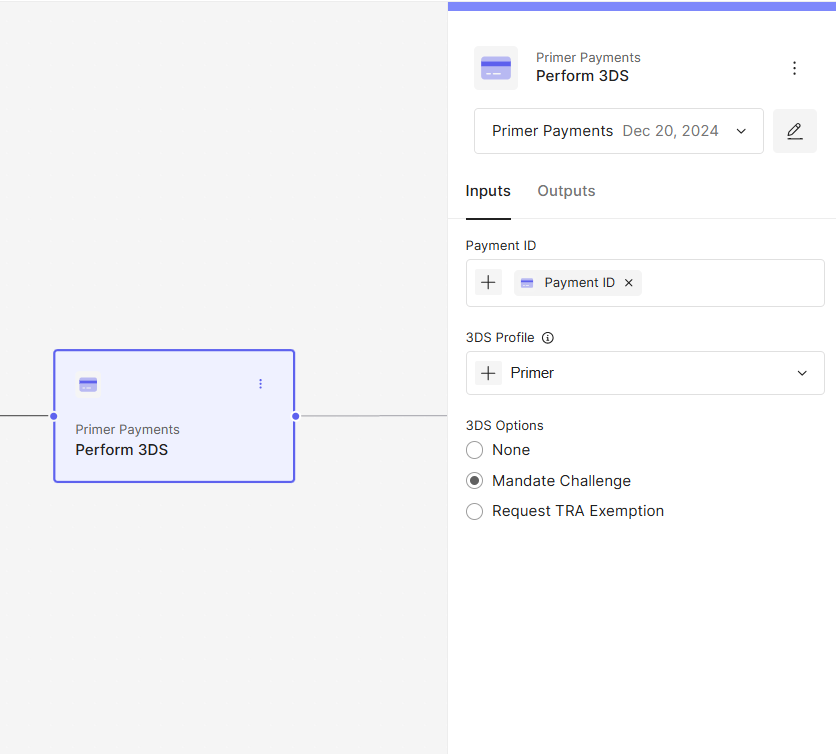
Mandate Challenge in the Perform 3DS action
- First time payments
- Transaction amount over £1000.00
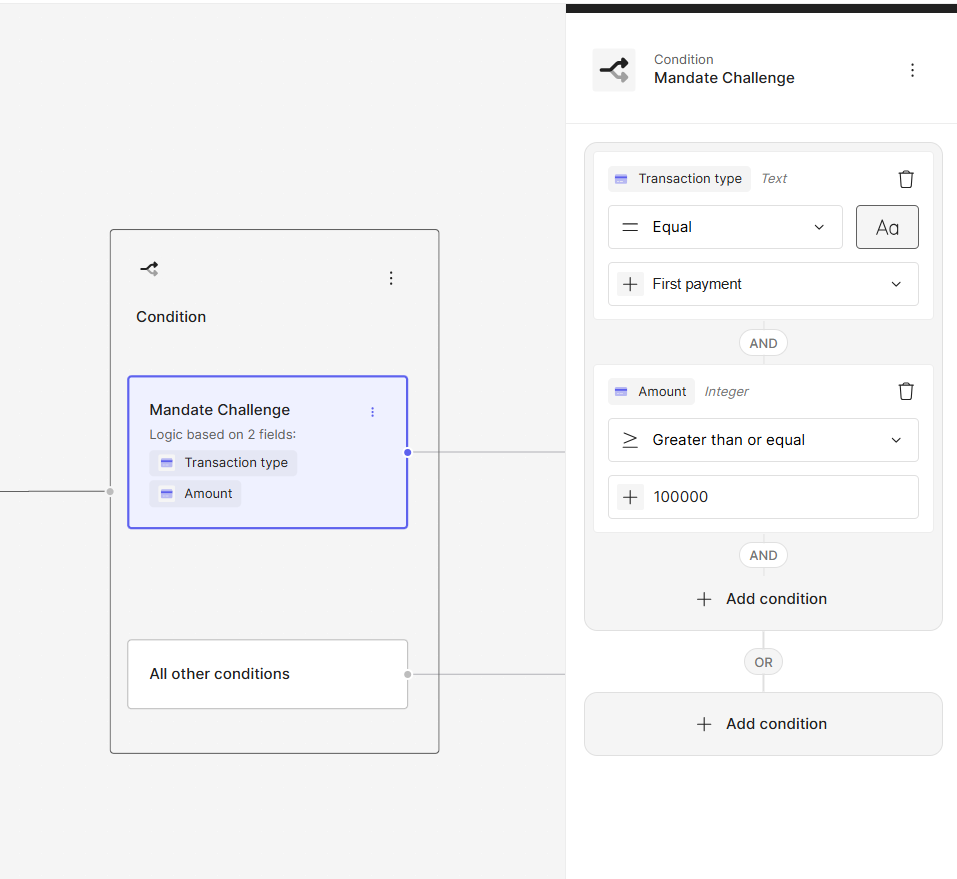
Condition Block for Mandate Challenge
Note: Mandating a challenge may increase friction during checkout and can impact conversion rates. It should be applied selectively, based on transaction context and business requirements.
Viewing Challenge Results
You can see whether a challenge was presented in both the Dashboard and API responses:-
Dashboard:
The 3DS Authentication section will display the authentication method used -
ChallengeorFrictionless. -
API:
The
paymentMethod.threeDSecureAuthentication.challengeIssuedboolean will returnTRUEif a challenge was presented.
Best Practices
- Always use a challenge for first-time card storage (MIT setup) in regulated regions. This ensures regulatory compliance and reduces the risk of failed subsequent MITs.
- Combine with conditions. For example, only mandate challenges for new customers, high-risk transactions, or first-time card use.
- Monitor completion rates. Track your 3DS challenge completion success to balance security and conversion.