
New feature. Manual payment approval is available to all merchants; no allowlisting or account setup is required. Because it’s new, test your integration end to end in the sandbox before going live in production. Available on the Web SDK (Primer Checkout) today; iOS and Android are coming.
When to use it
Use manual payment approval when a server-side decision must happen after the customer enters their payment details but before the payment is created. For example:- Running a fraud or risk check against the card BIN or network.
- Confirming stock or inventory at the last moment.
- Applying business rules that decide whether the payment should proceed at all.
How it works
The flow is approval-based and payment-method agnostic, and the same sequence works for cards and APMs.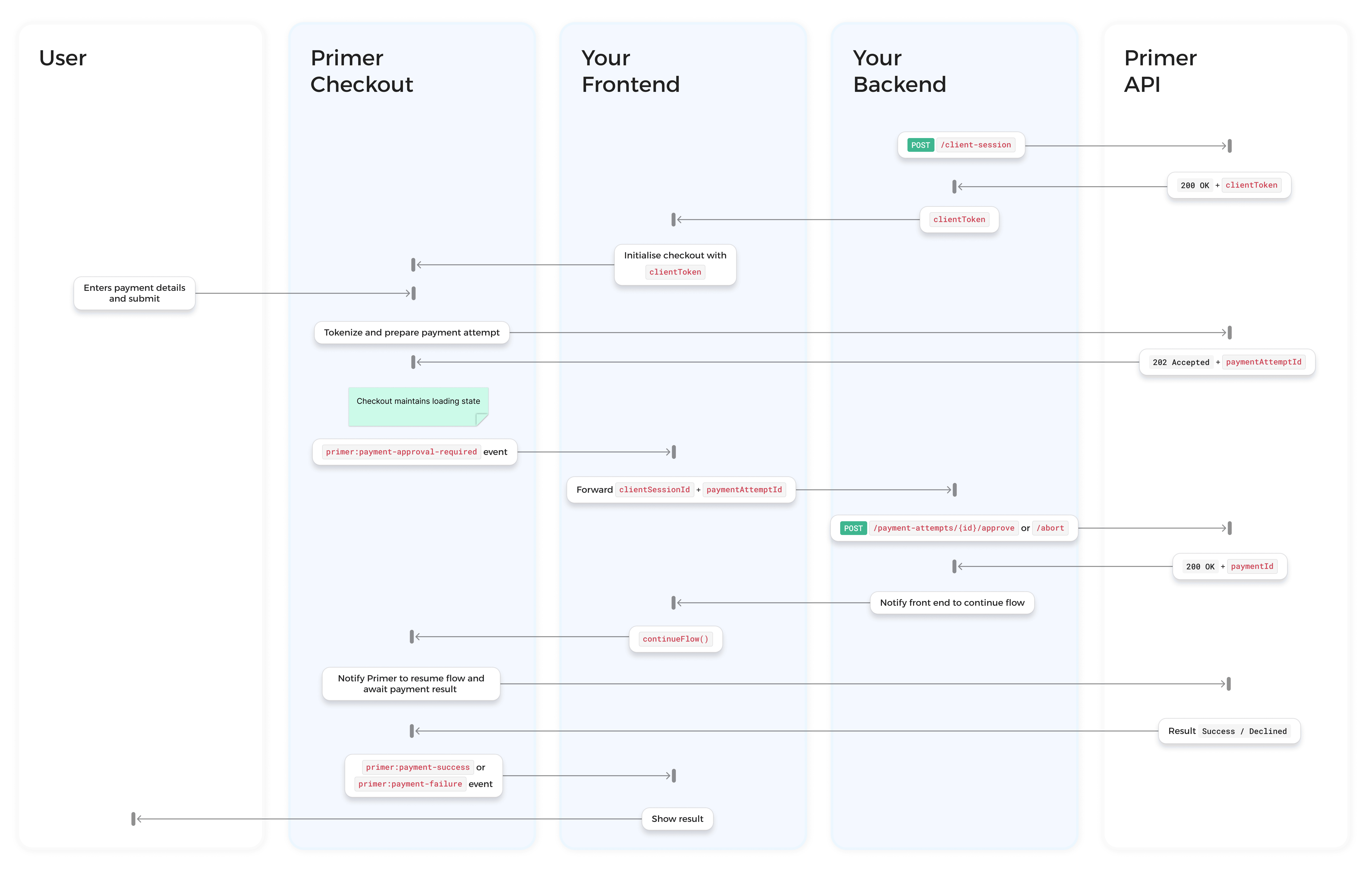
Manual payment approval flow
- Your server creates a client session with
approvalMode: "MANUAL". - The customer submits their payment details. Primer tokenizes the payment method and prepares a payment attempt, but does not create the payment yet.
- The checkout emits
primer:payment-approval-requiredwith thepaymentAttemptId. The SDK maintains a loading state. - Your backend decides and calls either
/approve(create the payment) or/abort(cancel it). - Your frontend calls
continueFlow(). Primer fetches the result and resolves the checkout UI, including any 3DS challenge, automatically.
Approval is scoped to a single payment attempt, not the whole session. If a payment is declined, the customer can retry within the same session, which creates a new attempt. See Retries.
Prerequisites
- Primer Checkout already integrated (see First payment).
- An API key with the following scopes:
client_tokens:writefor creating the client session.transactions:authorizefor approving a payment attempt.transactions:cancelfor aborting a payment attempt.
Step 1. Create a client session in MANUAL mode
Create the client session on your server and setapprovalMode to MANUAL. This is set at creation only and is immutable; it cannot be changed with PATCH /client-session.
clientToken to your frontend and render the checkout:
Step 2. Listen for the approval event
When the customer confirms their intention to pay, the checkout dispatchesprimer:payment-approval-required instead of creating the payment. Register a listener on the checkout element:
Event payload
primer:payment-approval-required is a CustomEvent; its data is on event.detail.
Step 3. Approve or abort from your backend
Your backend uses thepaymentAttemptId from the event to either approve or abort the attempt.
Approve
Approving triggers payment creation. Primer creates the payment, runs any required action (such as 3DS), and processes it.200 OK confirms the approval was accepted and Primer has resumed control:
paymentId to look the payment up later via the Payments API. The 200 confirms approval only; it does not convey the payment outcome (success, decline, or 3DS required). The SDK resolves the outcome after you call continueFlow().
Abort
Aborting cancels the attempt. No payment is created and the tokenized payment method is invalidated.reason field is optional free text; do not include cardholder data. Primer stores it for internal observability only: it is not currently shown in the Dashboard or retrievable via the API. A 200 OK returns { "paymentAttemptId": "..." }.
Error responses
paymentAttemptId acts as the idempotency key, so a duplicate or retried /approve never creates a second payment.A replay does not return the original 200. Instead it returns 409 IdempotencyKeyAlreadyExists, which confirms the payment was already created for that attempt (for example, if your first call succeeded but its response timed out).Treat that 409 as “already approved”: look the payment up via the Payments API or the webhooks below, and don’t create a new attempt.Step 4. Resume the checkout
After your backend responds, callcontinueFlow() from the event handler. The SDK fetches the client session and the resulting payment and resolves the UI on its own; you don’t route payment results back to the SDK.
- Approved and successful → the checkout shows its success screen.
- Approved and requires 3DS → the SDK presents the 3DS challenge, then resolves to success or failure automatically.
- Approved but declined, or aborted → the checkout unlocks the payment method form and shows a message that the payment could not be completed. The customer can retry with the same or a different payment method, which starts a new attempt.
primer:payment-success and primer:payment-failure to react to the outcome. You don’t need any approval-specific result handling.
These events update the customer-facing UI. The source of truth for your backend is webhooks; a backend-driven integration shouldn’t rely on the browser to confirm a payment.Once you approve, the payment follows the normal Primer payment lifecycle, so your server receives the standard
PAYMENT.STATUS webhook as the payment moves to AUTHORIZED, DECLINED, or a failed state, exactly as in the automatic flow.Use those webhooks to fulfill the order and reconcile. See Configure webhooks.continueFlow() is the primary signal, but as a safety net the SDK also polls automatically after a few seconds if continueFlow() is never called (for example after a frontend crash). You should still always call it for the best experience.Full example
Lifecycle and edge cases
While awaiting approval
Between theprimer:payment-approval-required event and your continueFlow() call, the checkout is locked: it shows a loading state and the customer cannot change payment method or submit again. This prevents a race between a new tokenization and an in-flight /approve. The checkout reports this through primer:state-change as isProcessing: true. Once you call continueFlow() and the attempt resolves, the checkout unlocks, showing the result on success, or returning the customer to the payment form to retry after a decline.
Retries after a failed payment
A payment decline (card declined, 3DS failure, abandonment) is a payment-level outcome; it does not reopen the attempt. To retry, the customer selects a payment method and re-enters their details, which tokenizes a new attempt within the same session and emits a freshprimer:payment-approval-required event. You don’t need a new client session.
Only one attempt can be active at a time. A new attempt can only start once the previous one is in a terminal state (declined, aborted, or expired). Retries are bounded by the session’s lifetime (24 hours).
3DS
3DS is handled automatically after approval; you don’t write any 3DS code. When the customer abandons or fails a 3DS challenge, Primer treats it as a payment decline and the standard retry path applies.Timeout
While your backend decides, the customer waits on a loading state and the checkout is locked (see While awaiting approval), so make the decision quickly. If your backend calls neither/approve nor /abort within 90 seconds, the attempt expires automatically. No payment is created and the tokenized payment method is invalidated. The checkout unlocks the payment method form with a message that the payment could not be completed, and the customer can retry. The 90-second window is fixed and is not configurable. A subsequent /approve or /abort on an expired attempt returns 410 PaymentAttemptExpired.
Browser refresh
If the customer refreshes mid-flow, the SDK re-reads the session state and resumes accordingly:See also
Events reference
Full reference for primer:payment-approval-required and all other events
Approve a payment attempt
API reference for the approve endpoint
Abort a payment attempt
API reference for the abort endpoint
Client session
Create and configure a client session
Migrating from the legacy flow
Move an existing manual payment creation integration to this flow