> ## Documentation Index
> Fetch the complete documentation index at: https://primer.io/docs/llms.txt
> Use this file to discover all available pages before exploring further.
# Monitor event created Trigger
## Primer Monitors app
The Primer Monitors app gives you a trigger to react to new monitor events from our [Monitors](/docs/monitors/overview) product. Now you have complete control to build your own notification flows however you want - send yourself a web request, a Slack message, an email, or immediately create an incident.
## Trigger outputs
The Monitor event created trigger returns two objects: the monitor object, and the monitor event object. Some fields are only returned for static monitors, and some only for dynamic monitors.
### Monitor
| Output | Type | Description |
| ------------------------- | ------ | --------------------------------------------------------------------------------------------------------------------- |
| ID | number | The monitor Id. |
| Name | text | The custom name given to the monitor. |
| Metric | text | The metric used for this monitor, for example *Payment.paymentsDeclinedCount*. |
| Type | text | `THRESHOLD` for static monitors or `ANOMALY` for dynamic monitors. |
| Threshold value | number | Define the value that should trigger the monitor when compared to the measured value. |
| Threshold direction | text | Define if the monitor should trigger when the measured value is `ABOVE` or `BELOW` the threshold value. |
| Minimum number of samples | number | If this is greater than zero, the monitor will only trigger when at least this many payments are in the event window. |
### Monitor Events
| Output | Type | Description |
| ------------------ | -------- | ---------------------------------------------------------------------------------------------------------------------- |
| Event ID | number | The ID for the specific event, can be used to construct a deeplink to Primer's dashboard. |
| Event date | datetime | Datetime in UTC when this event was created. |
| Event window start | datetime | Datetime in UTC for the start of the observed period. |
| Event window end | datetime | Datetime in UTC for the end of the observed period. |
| Measured value | number | Measured value in this event window. |
| Lower bound | number | The lower end of the expected range for this window, depending on the metric used. Only returned for dynamic monitors. |
| Upper bound | number | The upper end of the expected range for this window, depending on the metric used. Only returned for dynamic monitors. |
| Samples | number | The amount of payments within this event window. |
## Example flow
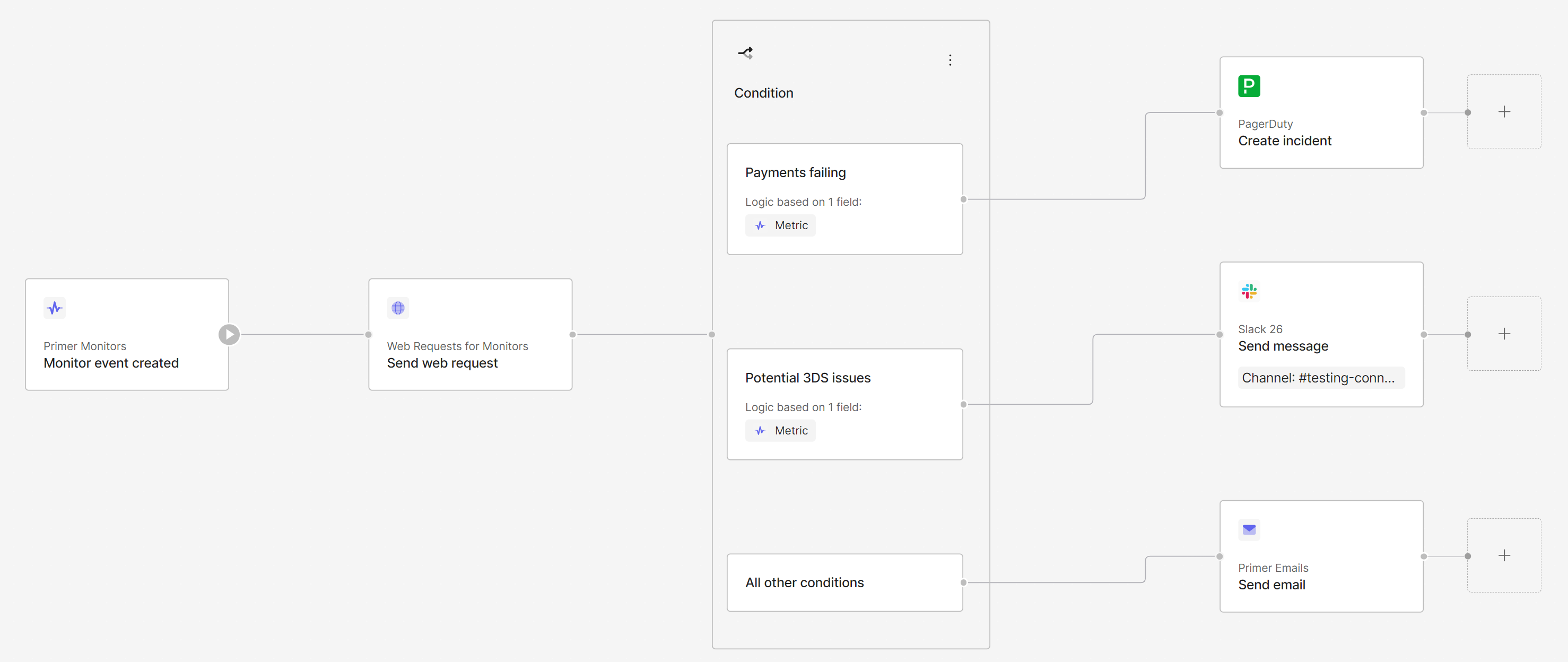
Here is an example for a workflow using this trigger: whenever a new monitor event is created, a web request is sent notifying a dedicated endpoint. Afterwards, depending on the metric used, an incident is created via PagerDuty when too many payments start failing, a Slack message is sent when potential 3DS issues are observed, and an email is sent for any other metric. All within one notification flow:
 ## Workflow Runs
[Workflow Runs](/docs/workflows/monitor-workflows/overview) are automatically available for any workflow that was executed using this trigger.
## Workflow Runs
[Workflow Runs](/docs/workflows/monitor-workflows/overview) are automatically available for any workflow that was executed using this trigger.