> ## Documentation Index
> Fetch the complete documentation index at: https://primer.io/docs/llms.txt
> Use this file to discover all available pages before exploring further.
# Payment lifecycle
export const TxnTag = ({status}) => {
const getStyles = status => {
const baseStyle = {
display: 'inline-block',
padding: '4px 8px',
borderRadius: '4px',
fontSize: '13px',
fontWeight: '400'
};
switch (status) {
case "PENDING":
return {
...baseStyle,
backgroundColor: '#ececec',
color: '#9f9f9f'
};
case "AUTHORIZED":
return {
...baseStyle,
backgroundColor: '#ecfdf5',
color: '#047857'
};
case "SETTLED":
case "PARTIALLY_SETTLED":
return {
...baseStyle,
backgroundColor: '#ecfdf5',
color: '#047857'
};
case "DECLINED":
case "FAILED":
return {
...baseStyle,
backgroundColor: '#fef2f2',
color: '#dc2626'
};
case "CANCELLED":
return {
...baseStyle,
backgroundColor: '#fefce8',
color: '#d78203'
};
case "SETTLING":
return {
...baseStyle,
backgroundColor: '#e0f2fe',
color: '#0c4a6e'
};
default:
return {
...baseStyle,
backgroundColor: '#f3f4f6',
color: '#374151'
};
}
};
return {status};
};
All Primer payments conform to a unified payment lifecycle, which makes them work the same way regardless of the payment services you need.
A payment always has a **payment status**. Each payment will progress through some combination of the statuses listed below on their way through your workflow.
A newly-created payment is assigned the status .
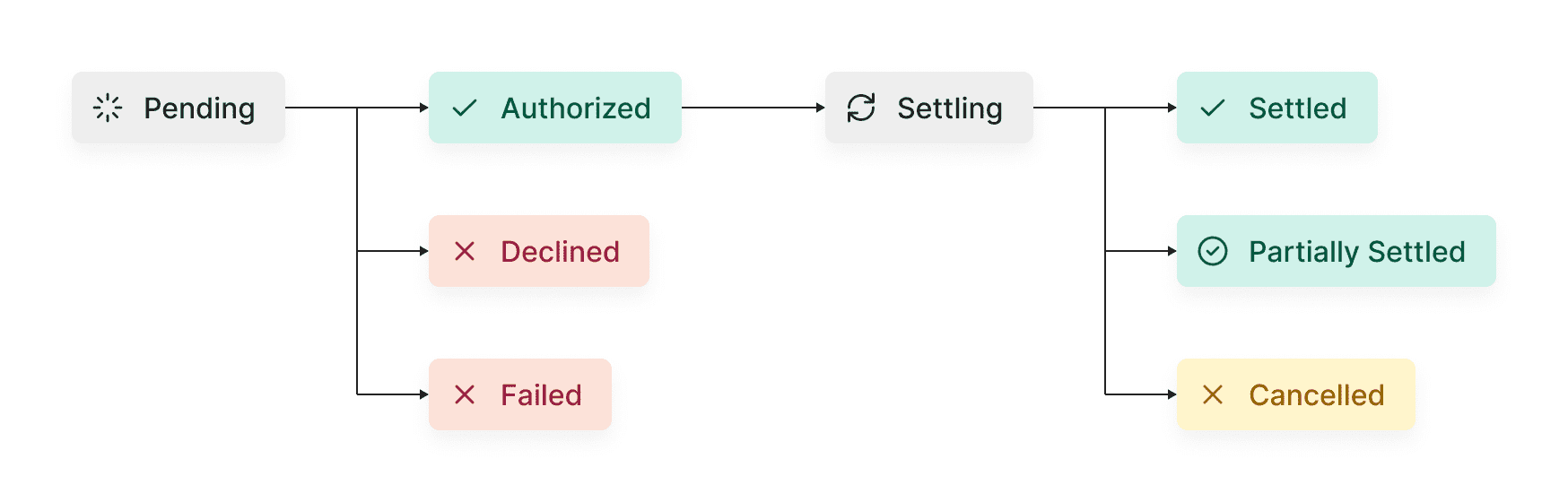
The payment is awaiting a subsequent action or callback. This usually occurs with asynchronous processors. Prepare for this contingency by [setting up Webhooks](/docs/api-reference/get-started/configure-webhooks).
The processor has authorized the payment and no further status-altering actions
have been defined in your Workflow.
The processor has settled funds in your account. If the entirety of the payment amount has been settled, the payment will have the status .
Some processors allow for the [capture of only a part of the authorized amount](/docs/api-reference/v2.4/api-reference/payments-api/capture-a-payment#body-amount). If you leverage this capability, the payment status will be set to .
The processor has declined the payment and no further status-altering actions have
been defined in your Workflow. You may want to consider retrying certain declined
payments.
This usually occurs when there is a processor gateway issue, such as a service
disruption. Set up retries and [fallbacks](/docs/payment-services/fallbacks) to mitigate
failures.
The payment was canceled prior to it being settled.
The payment has been submitted for settlement and funds will be settled later.
This usually occurs with asynchronous processors. Prepare for this contingency
by [setting up Webhooks](/docs/api-reference/get-started/configure-webhooks).
### Enforcing the payments lifecycle
The [Payments API](/docs/api-reference/v2.4/api-reference/payments-api/get-a-payment) enforces our payments lifecycle state machine and returns a validation error if an API call is attempted where the payment status doesn't support that action.
The error status code returned is `400` with `errorId` = `InvalidPaymentStatus`
See below for the breakdown of the API requests and what's supported for each payment status (table scrolls horizontally):
| API Request | PENDING | AUTHORIZED | SETTLING | SETTLED | PARTIALLY\_SETTLED | CANCELLED | DECLINED | FAILED |
| :---------------- | ------- | ---------- | -------- | ------- | ------------------ | --------- | -------- | ------ |
| `POST /authorize` | Allow | Block | Block | Block | Block | Block | Allow | Allow |
| `POST /cancel` | Allow | Allow | Allow | Block | Block | Block | Block | Block |
| `POST /capture` | Block | Allow | Allow | Block | Allow | Block | Block | Block |
| `POST /decline` | Allow | Block | Block | Block | Block | Block | Block | Block |
| `POST /refund` | Block | Block | Block | Allow | Allow | Block | Block | Block |
Processors may not support all the actions for each payment status outlined in the above table e.g. some processors may support cancelling a payment, whilst others may not.