> ## Documentation Index
> Fetch the complete documentation index at: https://primer.io/docs/llms.txt
> Use this file to discover all available pages before exploring further.
# API v2.3 to v2.4
API Version 2.4 will be released on February 5th 2025, bringing key improvements to payment processing, timeout management, and refund capabilities. This migration guide provides a detailed overview of the changes, their impact, and best practices to ensure a smooth transition.
Use this guide alongside our full API reference documentation while preparing to upgrade, and please don't hesitate to contact Primer Support if you need assistance.
## General Requirements
This version includes improvements to the Client Session API, Payments API and the Payment Methods API. You must set the `X-Api-Version` header to `2.4` to use v2.4 of the API.
## SDK Requirements
To test API v2.4 you must opt-in to use the specific version within the Checkout SDKs.
### Web
Available in Web SDK v2.50.0 and later.\
To use API version 2.4, use the `UniversalCheckoutOptions.apiVersion` property when initializing the checkout.
```tsx theme={"dark"}
await Primer.showUniversalCheckout(clientToken, {
container: '#container',
apiVersion: '2.4',
});
await Primer.createHeadless(clientToken, {
apiVersion: '2.4',
onAvailablePaymentMethodsLoad(methods) {
console.log('Available payment methods:', methods);
}
});
await Primer.showVaultManager(clientToken, {
container: '#container',
apiVersion: '2.4',
});
```
### iOS
Available in iOS SDK v2.34.0 and later.
To use API version 2.4, set the apiVersion to `v2_4` in your `PrimerSettings` before initializing the checkout.
```swift theme={"dark"}
let settings = PrimerSettings(
…
apiVersion: PrimerApiVersion.v2_4
)
```
### Android
Available in Android SDK v2.35.0 and later.
To use API version 2.4, set the apiVersion to `v2_4` in your `PrimerSettings` before initializing the checkout.
```kotlin theme={"dark"}
val settings = PrimerSettings(
…
apiVersion = PrimerApiVersion.v2_4
)
```
### React Native
Available in React Native SDK v2.30.0 and later.
To use API version 2.4, set the apiVersion to `2.4` in your `PrimerSettings` before initializing the checkout.
```typescript theme={"dark"}
let settings: PrimerSettings = {
…
apiVersion: '2.4'
};
```
## Payment Types
Our `paymentType` [field](/docs/api-reference/v2.4/api-reference/payments-api/create-payment#body-payment-method-payment-type) is used to send the correct information to processors for payment method storage, recurring and credential-on-file payments.
In API v2.4 we have changed the way this field is calculated and also upgraded our related recurring payments logic to be more accurate and intuitive. You can read more about how it works in our [guide to optimizing recurring payments](/docs/get-started/recurring-payments#optimize-for-recurring-payments).
If you process merchant-initiated payments or allow customers to store their payment methods for easier checkout, this change directly impacts you. We strongly recommend upgrading to benefit from the improved logic and ensure seamless processing.
For your own records and workflow logic, we recommend you pass a `paymentType` based on the type of payment flow. However, if you do not pass one, we will calculate the most likely down stream value required from context.
### Payment Types – Main changes
If you **do not pass** a `paymentType` when creating a payment, we will no longer assign it a value. Instead the `paymentType` field will remain blank and our improved internal logic will send the best possible information to your end processor(s).
This is in contrast to previous API versions, where if a `paymentType` was not passed, a value was calculated and passed back based on whether the payment method had been previously vaulted and whether any intention to vault was passed.
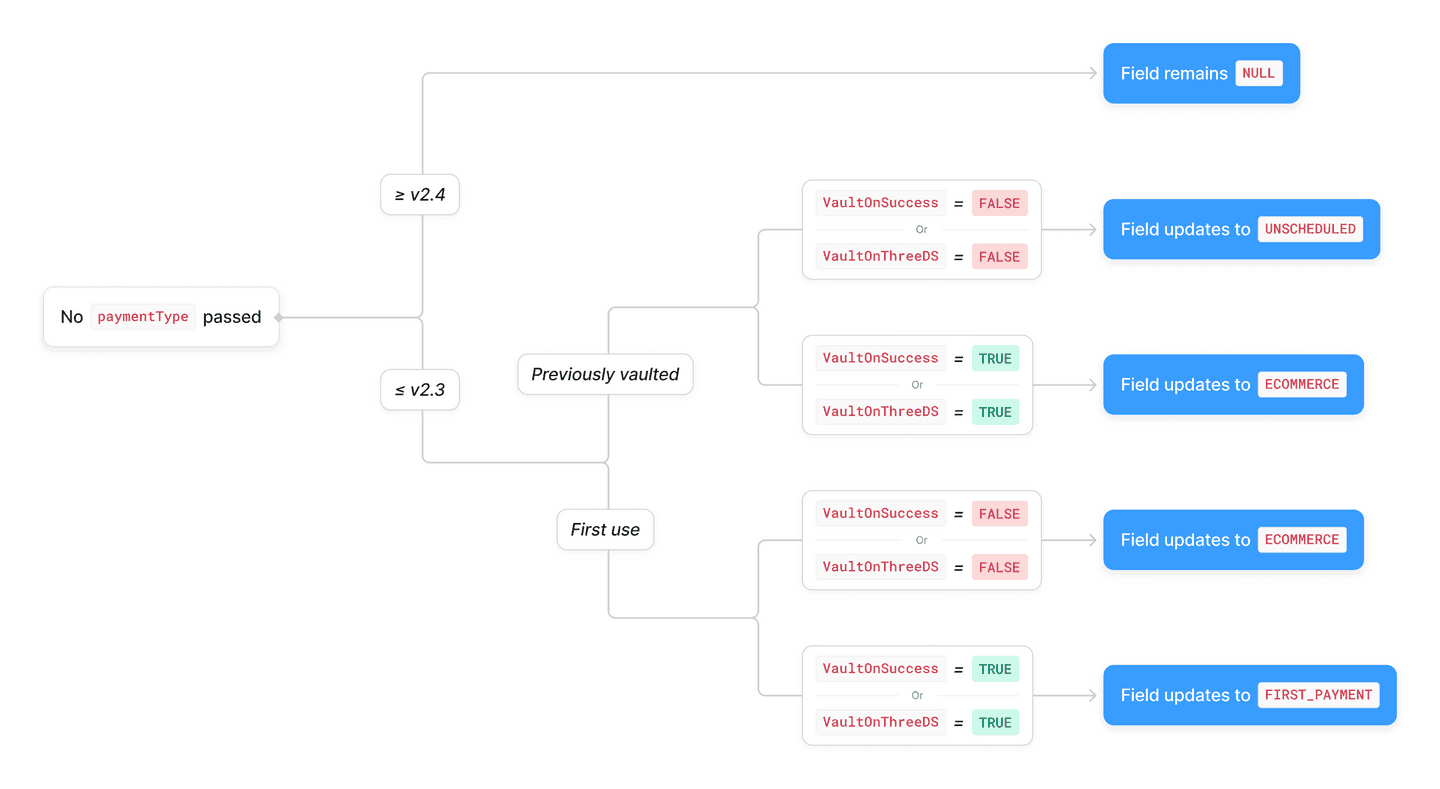 #### These changes bring the following improvements:
* Resolves a known issue where payments made without a `paymentType` initiated by customers using a previously vaulted card were flagged as `paymentType : UNSCHEDULED` – these will now remain with a null `paymentType` value. This will also ensure that the [Payment Initiation Type](/docs/workflows/apps/native-apps/primer-payments-app/payment-created-trigger#use-cases) in the “Payment created” Trigger can be relied on to route these payments correctly.
* Resolves a known issue where one-off payments made without a `paymentType` were incorrectly marked as `ECOMMERCE` – these will now remain with a null `paymentType` value.
* Vaulted payment methods will be passed to the end processor with the correct processor specific fields, regardless of whether a `paymentType` is passed through or if the incorrect value is used.
* This is particularly relevant when using our Drop-in, where customers can select a Vaulted payment method without the front end being explicitly notified, which can result in invalid `paymentType` values being used.
* Payment methods that cannot be vaulted will never be passed to the end processor with an instruction to vault, regardless of what `paymentType` is passed through.
### Optional Parameter Addition – First Payment Reason
An optional field, `firstPaymentReason`, has been added to the [`paymentMethod` object](/docs/api-reference/v2.4/api-reference/payments-api/create-payment#request.body.paymentMethod), directly related to the paymentType logic:
* The enum `firstPaymentReason` allows you to indicate why a payment method is being vaulted when setting `paymentType : firstPayment`, with three possible values of `CardOnFile`, `Recurring`, and `Unscheduled`. Pass this field if using a processor that has [strict requirements](/docs/get-started/recurring-payments#optimize-for-recurring-payments) for card storage.
### Migration Steps – Payment Types
1. **Check current** `paymentType` **behavior**
* Ensure you’re passing the most logical `paymentType` when creating or patching a client session and creating a payment.
2. **Check if** `firstPaymentReason` **would benefit your payments**
* If you’re vaulting payment methods with `paymentType: firstPayment`, consider including the new parameter `firstPaymentReason` and setting it according to why the payment is being stored.
3. **Review Workflow Logic**
* Check your Primer workflows and ensure any changes do not impact your workflow logic.
* In particular, check if you’re currently using the Transaction Type input or output in your workflow routing, as this correlates to the `paymentType` parameter.
4. **Test and Validate**
* Use the sandbox environment to test your new implementation and ensure it continues to operate as expected with your Primer workflow logic and any internal requirements.
## Timeout Management Improvements
We have extended our payment API timeout from 25s to 90s, with a maximum processor timeout allowance of 60 seconds. Our SDK timeout remains at 15 seconds, to limit impacts on the customer experience.
The longer timeframe allows ample time for external processors with long timeout values to respond – the average maximum timeout allowance from processors is between 60 and 70s – while also allowing any additional internal operations by the Primer engine. This will minimize synchronization issues when a timeout occurs with an external processor, ensuring you can maintain full visibility of your payments within the Primer ecosystem.
To support this change, we have added a new [Decision Type](/docs/concepts/decline-codes/overview#decision-type) of `GATEWAY_TIMEOUT`. This will be returned when an external processor returns a timeout error or does not respond within our maximum processor timeout allowance.
The `GATEWAY_TIMEOUT` Decision Type is not included in [fallback trigger reasons](/docs/payment-services/fallbacks#when-are-fallbacks-triggered%3F) to avoid scenarios where a customer may inadvertently be charged twice. Once you have [upgraded your workflows](/docs/workflows/apps/overview#managing-updates), processor timeouts will be excluded from fallback logic.
You can use this new value to implement workflow logic and monitoring specific to timeouts, as well as get a full overview of your selected processors performance within your dashboards.
Please see our [timeouts documentation](/docs/concepts/decline-codes/timeouts) for more details on this change.
### Migration Steps – Timeouts
1. **Check what your own internal timeout values for Primer are set to**
* If you have a timeout value shorter than 90s set on your end, you may wish to:
* Amend it to be in line with our new values, or
* Add additional logic if the timeout value is hit to perform a `GET` request for the payment status at a later time
* This is particularly relevant if you're using the [manual payment creation flow](/docs/checkout/advanced/manual-payment-creation#web), as the potential time a payment may take to complete has now increased.
2. **Ensure the addition of a new Error Decision Type will not break your integration**
* The `GATEWAY_TIMEOUT` value is additive, so should not break any existing implementation. However if your integration is hardcoded to the API ≤v2.3 values for Error Decision Type, or if any of your own internal logic explicitly relies on those values, you will need to update your mappings to ensure no errors occur.
3. **Review Workflow Logic**
* Check your Primer workflows and ensure any changes do not impact your workflow logic.
* In particular, check if you’re currently using the Error Decision Type input or output in your workflow routing, as this will now include a new option and you will need to ensure it’s accounted for in your logic.
The `GATEWAY_TIMEOUT` value will not appear in your workflow outputs until you [update to the latest version](/docs/workflows/apps/overview#managing-updates) of the workflow action. Please ensure you follow these steps before updating.
4. **Test and Validate**
* Use the sandbox environment to test your new implementation and ensure it continues to operate as expected with your Primer workflow logic and any internal requirements.
## Partial Captures and Targeted Refunds
We are introducing partial captures and targeted refunds to address key reconciliation and payment workflows for marketplaces. These changes enable you to:
* Refund specific items or captures without affecting unrelated payments
* Align payments with logistics and marketplace sellers, and track seller payments and performance with unique transaction capture IDs
**New** `transactions.events` **in the Payment Object**:
* Each partial capture generates a unique `transactionEventId`, used in the reconciliation file
* You can choose to receive a list of transaction events for **captures** and other updates, by expanding the request:`/payments/{id}?expand=transactions.events`
**Targeted Refunds**:
* When performing a refund, you can specify the `transactionEventId` to target the partial capture.
**Note:** While these changes mark an important step forward, please note that this functionality will initially be available for a limited scope and select merchants. We prioritize stability and ensure a seamless implementation for broader availability in the future.
### How Partial Captures and Targeted Refunds Work
Each partial capture generates a **unique transactionEventId**, which is the key to track partial captures and to handle targeted refunds. This ID is included in reconciliation files and API responses.
To process targeted refunds (*a refund on a specific partial capture*), you need to store `transactions.events.id` in your system. This ID ensures you reference the right capture when making a refund.
### Partial Captures and Refunds – Main changes
* Add the **`transactions.events`** array to the Payment API, within the transaction object.
* Update accordingly the GET payments, POST refund and POST capture endpoints
* Use **`expand=transactions.events`** to get transaction event details.
* **Remove** `processorData.external_ids`, including `authorization_id`, from API and webhook payloads.
### Using Partial Captures and Refunds
#### Making a Partial Capture
* Every partial capture generates a **`transactionEventId`**.
* This ID is included in reconciliation files and API responses.
* To get a list of transaction events for captures and updates, use:
```bash theme={"dark"}
GET /payments/{id}?expand=transactions.events
```
#### Issuing a Targeted Refund
* Include the **`transactionEventId`** in the refund request to target a specific capture.
```bash theme={"dark"}
POST /payments/{id}/refund
{
"amount": 4000,
"transactionEventId": "57a2027d-36a6-494f-ad07-a6e1d0c77772",
"reason": "Customer returned item"
}
```
#### Retrieving Transaction Events
* When a payment update is received, you can retrieve transaction event details:
```bash theme={"dark"}
GET /payments/{id}?expand=transactions.events
```
#### Example Workflow
* Receive a webhook for a payment update:
```bash theme={"dark"}
{
"eventType": "PAYMENT.STATUS",
"payment":{
"id": "7kCpGx6Kk",
"amount": 5000,
}
…
}
```
* Retrieve transaction events to find `transactionEventId`:
```bash theme={"dark"}
GET /payments/7kCpGx6Kk?expand=transactions.events
```
**Note:** Event IDs can only be retrieved from the API call. They are not included in the webhook.
* For each **Capture** or **Refund** request, if you receive a **synchronous response** from the PSP, you can also expand the transaction events by including:
```bash theme={"dark"}
POST /payments/m002N9jDI/capture
{
"amount": 400,
"expand": ["transactions.events"],
"final": false
}
```
This allows you to retrieve additional transaction details directly within the response.
### Example API Responses
#### Partial Capture details from a GET Payment call with `?expand=transactions.events`
```bash theme={"dark"}
{
"id": "7kCpGx6Kk",
"status": "PARTIALLY_CAPTURED",
"amount": 10000,
…
"transactions": [
{
"date": "2024-10-19T14:44:40Z",
"amount": 10000,
"transactionType": "SALE",
"events": [
{
"id": "19de9641-f085-48a8-8278-7945fb78c7aa",
"type": "AUTHORIZATION_SUCCEEDED",
"amount": 10000
},
{
"id": "c0b4946e-b3e1-4664-b563-db13491ad35b",
"type": "CAPTURE_SUCCEEDED",
"amount": 1234,
"final": false
}
]
}
]
}
```
#### Targeted Refund details from a GET Payment call with `?expand=transactions.events`
```bash theme={"dark"}
{
"id": "7kCpGx6Kk",
"status": "PARTIALLY_REFUNDED",
…
"transactions": [
{
"transactionType": "REFUND",
"amount": 1000,
"events": [
{
"id": "7c136224-dd01-41fb-a5fa-cf9a5af9b704",
"type": "CAPTURE_SUCCEEDED",
"amount": 1000
}
]
}
]
}
```
### Migration Steps – Targeted Refunds
1. **Update Data Handling**
* Stop using **`processorData.external_ids`** in API responses.
* Use API calls to fetch transaction events instead.
2. **Store `transactionEventId`**
* Ensure your system maps **`transactions.events.id`** to internal records.
* Use this ID when issuing targeted refunds.
3. **Adapt Webhook Changes**,
If you were relying on web hooks to retrieve external ids, the external\_id field will no longer be included in webhook payloads. Instead you now need to:
* Receive the webhook.
* Perform a GET request with `?expand=transactions.events` to retrieve the `processorEventId` of the event, replacing the old external\_id field.
4. **Adjust Refund Workflows**
* Always include **`transactionEventId`** when issuing refunds.
* Update reconciliation to handle event-based refunds.
5. **Test and Validate**
* Use the sandbox environment to test partial captures and refunds.
* Verify API calls to ensure correct event tracking.
## Parameter addition – Vault On Agreement
The boolean `vaultOnAgreement` allows you to vault a payment method when an agreement mandate completes successfully in supporting processors (e.g., ACH via Stripe). Pass `true` to store customer payment methods in the Primer Vault for future billing in payment processors that rely on Agreement flows, like [ACH via Stripe](connections/payment-methods/ach/stripe).
#### These changes bring the following improvements:
* Resolves a known issue where payments made without a `paymentType` initiated by customers using a previously vaulted card were flagged as `paymentType : UNSCHEDULED` – these will now remain with a null `paymentType` value. This will also ensure that the [Payment Initiation Type](/docs/workflows/apps/native-apps/primer-payments-app/payment-created-trigger#use-cases) in the “Payment created” Trigger can be relied on to route these payments correctly.
* Resolves a known issue where one-off payments made without a `paymentType` were incorrectly marked as `ECOMMERCE` – these will now remain with a null `paymentType` value.
* Vaulted payment methods will be passed to the end processor with the correct processor specific fields, regardless of whether a `paymentType` is passed through or if the incorrect value is used.
* This is particularly relevant when using our Drop-in, where customers can select a Vaulted payment method without the front end being explicitly notified, which can result in invalid `paymentType` values being used.
* Payment methods that cannot be vaulted will never be passed to the end processor with an instruction to vault, regardless of what `paymentType` is passed through.
### Optional Parameter Addition – First Payment Reason
An optional field, `firstPaymentReason`, has been added to the [`paymentMethod` object](/docs/api-reference/v2.4/api-reference/payments-api/create-payment#request.body.paymentMethod), directly related to the paymentType logic:
* The enum `firstPaymentReason` allows you to indicate why a payment method is being vaulted when setting `paymentType : firstPayment`, with three possible values of `CardOnFile`, `Recurring`, and `Unscheduled`. Pass this field if using a processor that has [strict requirements](/docs/get-started/recurring-payments#optimize-for-recurring-payments) for card storage.
### Migration Steps – Payment Types
1. **Check current** `paymentType` **behavior**
* Ensure you’re passing the most logical `paymentType` when creating or patching a client session and creating a payment.
2. **Check if** `firstPaymentReason` **would benefit your payments**
* If you’re vaulting payment methods with `paymentType: firstPayment`, consider including the new parameter `firstPaymentReason` and setting it according to why the payment is being stored.
3. **Review Workflow Logic**
* Check your Primer workflows and ensure any changes do not impact your workflow logic.
* In particular, check if you’re currently using the Transaction Type input or output in your workflow routing, as this correlates to the `paymentType` parameter.
4. **Test and Validate**
* Use the sandbox environment to test your new implementation and ensure it continues to operate as expected with your Primer workflow logic and any internal requirements.
## Timeout Management Improvements
We have extended our payment API timeout from 25s to 90s, with a maximum processor timeout allowance of 60 seconds. Our SDK timeout remains at 15 seconds, to limit impacts on the customer experience.
The longer timeframe allows ample time for external processors with long timeout values to respond – the average maximum timeout allowance from processors is between 60 and 70s – while also allowing any additional internal operations by the Primer engine. This will minimize synchronization issues when a timeout occurs with an external processor, ensuring you can maintain full visibility of your payments within the Primer ecosystem.
To support this change, we have added a new [Decision Type](/docs/concepts/decline-codes/overview#decision-type) of `GATEWAY_TIMEOUT`. This will be returned when an external processor returns a timeout error or does not respond within our maximum processor timeout allowance.
The `GATEWAY_TIMEOUT` Decision Type is not included in [fallback trigger reasons](/docs/payment-services/fallbacks#when-are-fallbacks-triggered%3F) to avoid scenarios where a customer may inadvertently be charged twice. Once you have [upgraded your workflows](/docs/workflows/apps/overview#managing-updates), processor timeouts will be excluded from fallback logic.
You can use this new value to implement workflow logic and monitoring specific to timeouts, as well as get a full overview of your selected processors performance within your dashboards.
Please see our [timeouts documentation](/docs/concepts/decline-codes/timeouts) for more details on this change.
### Migration Steps – Timeouts
1. **Check what your own internal timeout values for Primer are set to**
* If you have a timeout value shorter than 90s set on your end, you may wish to:
* Amend it to be in line with our new values, or
* Add additional logic if the timeout value is hit to perform a `GET` request for the payment status at a later time
* This is particularly relevant if you're using the [manual payment creation flow](/docs/checkout/advanced/manual-payment-creation#web), as the potential time a payment may take to complete has now increased.
2. **Ensure the addition of a new Error Decision Type will not break your integration**
* The `GATEWAY_TIMEOUT` value is additive, so should not break any existing implementation. However if your integration is hardcoded to the API ≤v2.3 values for Error Decision Type, or if any of your own internal logic explicitly relies on those values, you will need to update your mappings to ensure no errors occur.
3. **Review Workflow Logic**
* Check your Primer workflows and ensure any changes do not impact your workflow logic.
* In particular, check if you’re currently using the Error Decision Type input or output in your workflow routing, as this will now include a new option and you will need to ensure it’s accounted for in your logic.
The `GATEWAY_TIMEOUT` value will not appear in your workflow outputs until you [update to the latest version](/docs/workflows/apps/overview#managing-updates) of the workflow action. Please ensure you follow these steps before updating.
4. **Test and Validate**
* Use the sandbox environment to test your new implementation and ensure it continues to operate as expected with your Primer workflow logic and any internal requirements.
## Partial Captures and Targeted Refunds
We are introducing partial captures and targeted refunds to address key reconciliation and payment workflows for marketplaces. These changes enable you to:
* Refund specific items or captures without affecting unrelated payments
* Align payments with logistics and marketplace sellers, and track seller payments and performance with unique transaction capture IDs
**New** `transactions.events` **in the Payment Object**:
* Each partial capture generates a unique `transactionEventId`, used in the reconciliation file
* You can choose to receive a list of transaction events for **captures** and other updates, by expanding the request:`/payments/{id}?expand=transactions.events`
**Targeted Refunds**:
* When performing a refund, you can specify the `transactionEventId` to target the partial capture.
**Note:** While these changes mark an important step forward, please note that this functionality will initially be available for a limited scope and select merchants. We prioritize stability and ensure a seamless implementation for broader availability in the future.
### How Partial Captures and Targeted Refunds Work
Each partial capture generates a **unique transactionEventId**, which is the key to track partial captures and to handle targeted refunds. This ID is included in reconciliation files and API responses.
To process targeted refunds (*a refund on a specific partial capture*), you need to store `transactions.events.id` in your system. This ID ensures you reference the right capture when making a refund.
### Partial Captures and Refunds – Main changes
* Add the **`transactions.events`** array to the Payment API, within the transaction object.
* Update accordingly the GET payments, POST refund and POST capture endpoints
* Use **`expand=transactions.events`** to get transaction event details.
* **Remove** `processorData.external_ids`, including `authorization_id`, from API and webhook payloads.
### Using Partial Captures and Refunds
#### Making a Partial Capture
* Every partial capture generates a **`transactionEventId`**.
* This ID is included in reconciliation files and API responses.
* To get a list of transaction events for captures and updates, use:
```bash theme={"dark"}
GET /payments/{id}?expand=transactions.events
```
#### Issuing a Targeted Refund
* Include the **`transactionEventId`** in the refund request to target a specific capture.
```bash theme={"dark"}
POST /payments/{id}/refund
{
"amount": 4000,
"transactionEventId": "57a2027d-36a6-494f-ad07-a6e1d0c77772",
"reason": "Customer returned item"
}
```
#### Retrieving Transaction Events
* When a payment update is received, you can retrieve transaction event details:
```bash theme={"dark"}
GET /payments/{id}?expand=transactions.events
```
#### Example Workflow
* Receive a webhook for a payment update:
```bash theme={"dark"}
{
"eventType": "PAYMENT.STATUS",
"payment":{
"id": "7kCpGx6Kk",
"amount": 5000,
}
…
}
```
* Retrieve transaction events to find `transactionEventId`:
```bash theme={"dark"}
GET /payments/7kCpGx6Kk?expand=transactions.events
```
**Note:** Event IDs can only be retrieved from the API call. They are not included in the webhook.
* For each **Capture** or **Refund** request, if you receive a **synchronous response** from the PSP, you can also expand the transaction events by including:
```bash theme={"dark"}
POST /payments/m002N9jDI/capture
{
"amount": 400,
"expand": ["transactions.events"],
"final": false
}
```
This allows you to retrieve additional transaction details directly within the response.
### Example API Responses
#### Partial Capture details from a GET Payment call with `?expand=transactions.events`
```bash theme={"dark"}
{
"id": "7kCpGx6Kk",
"status": "PARTIALLY_CAPTURED",
"amount": 10000,
…
"transactions": [
{
"date": "2024-10-19T14:44:40Z",
"amount": 10000,
"transactionType": "SALE",
"events": [
{
"id": "19de9641-f085-48a8-8278-7945fb78c7aa",
"type": "AUTHORIZATION_SUCCEEDED",
"amount": 10000
},
{
"id": "c0b4946e-b3e1-4664-b563-db13491ad35b",
"type": "CAPTURE_SUCCEEDED",
"amount": 1234,
"final": false
}
]
}
]
}
```
#### Targeted Refund details from a GET Payment call with `?expand=transactions.events`
```bash theme={"dark"}
{
"id": "7kCpGx6Kk",
"status": "PARTIALLY_REFUNDED",
…
"transactions": [
{
"transactionType": "REFUND",
"amount": 1000,
"events": [
{
"id": "7c136224-dd01-41fb-a5fa-cf9a5af9b704",
"type": "CAPTURE_SUCCEEDED",
"amount": 1000
}
]
}
]
}
```
### Migration Steps – Targeted Refunds
1. **Update Data Handling**
* Stop using **`processorData.external_ids`** in API responses.
* Use API calls to fetch transaction events instead.
2. **Store `transactionEventId`**
* Ensure your system maps **`transactions.events.id`** to internal records.
* Use this ID when issuing targeted refunds.
3. **Adapt Webhook Changes**,
If you were relying on web hooks to retrieve external ids, the external\_id field will no longer be included in webhook payloads. Instead you now need to:
* Receive the webhook.
* Perform a GET request with `?expand=transactions.events` to retrieve the `processorEventId` of the event, replacing the old external\_id field.
4. **Adjust Refund Workflows**
* Always include **`transactionEventId`** when issuing refunds.
* Update reconciliation to handle event-based refunds.
5. **Test and Validate**
* Use the sandbox environment to test partial captures and refunds.
* Verify API calls to ensure correct event tracking.
## Parameter addition – Vault On Agreement
The boolean `vaultOnAgreement` allows you to vault a payment method when an agreement mandate completes successfully in supporting processors (e.g., ACH via Stripe). Pass `true` to store customer payment methods in the Primer Vault for future billing in payment processors that rely on Agreement flows, like [ACH via Stripe](connections/payment-methods/ach/stripe).